

Overview
A React single page application (SPA) is a web app where client-side routing swaps views without loading a new HTML document on every internal click. The user moves from a dashboard to a project list to settings, the URL changes, and the browser keeps the same page running the whole time.
Two things often get mixed up here. React is a library for building user interfaces. An SPA is an architecture - a way the app handles navigation. React works in SPAs, but it also powers server-rendered and statically generated sites. This guide covers how a React SPA works, how routing gives it multiple pages, a tested example with Vite and React Router, and how to decide whether the approach fits your project.
What Is a React SPA?
A single page application loads one HTML document and then updates what's on screen with JavaScript. "Single page" refers to that document, not to how much content the user sees. It's not a landing page with one long scroll.
Picture a customer portal with three sections: /dashboard, /projects, and /settings. Each has its own URL, its own layout, its own data. Clicking between them feels like moving between pages. But in an SPA, the browser doesn't request a new HTML file for those clicks - the router swaps React components and updates the address bar.
That's why the number of screens or components says nothing about the architecture. Fifty routes can still be one single page app. And a project with App.jsx and index.html in its source folder might be server-rendered, statically generated, or something else entirely. Files don't decide it.
The rule of thumb: an SPA is defined by how navigation behaves, not by how many screens it has.
How a React App Works as a Single Page Application
Here's what happens from the moment the browser loads the app:
- The browser requests a URL and gets the initial HTML, plus links to JavaScript and CSS files. In a client-rendered SPA, that HTML is mostly an empty root element, like
<div id="root"></div>. With server rendering or pre-rendering, it already contains markup. - The JavaScript runs. React either renders the interface into the root element or hydrates markup that's already there.
- The router reads the browser URL and picks the correct view.
- User actions change state or send requests to an API.
- React updates the parts of the interface that changed.
- On an internal link click, the router updates the URL and renders the new view. No new document.
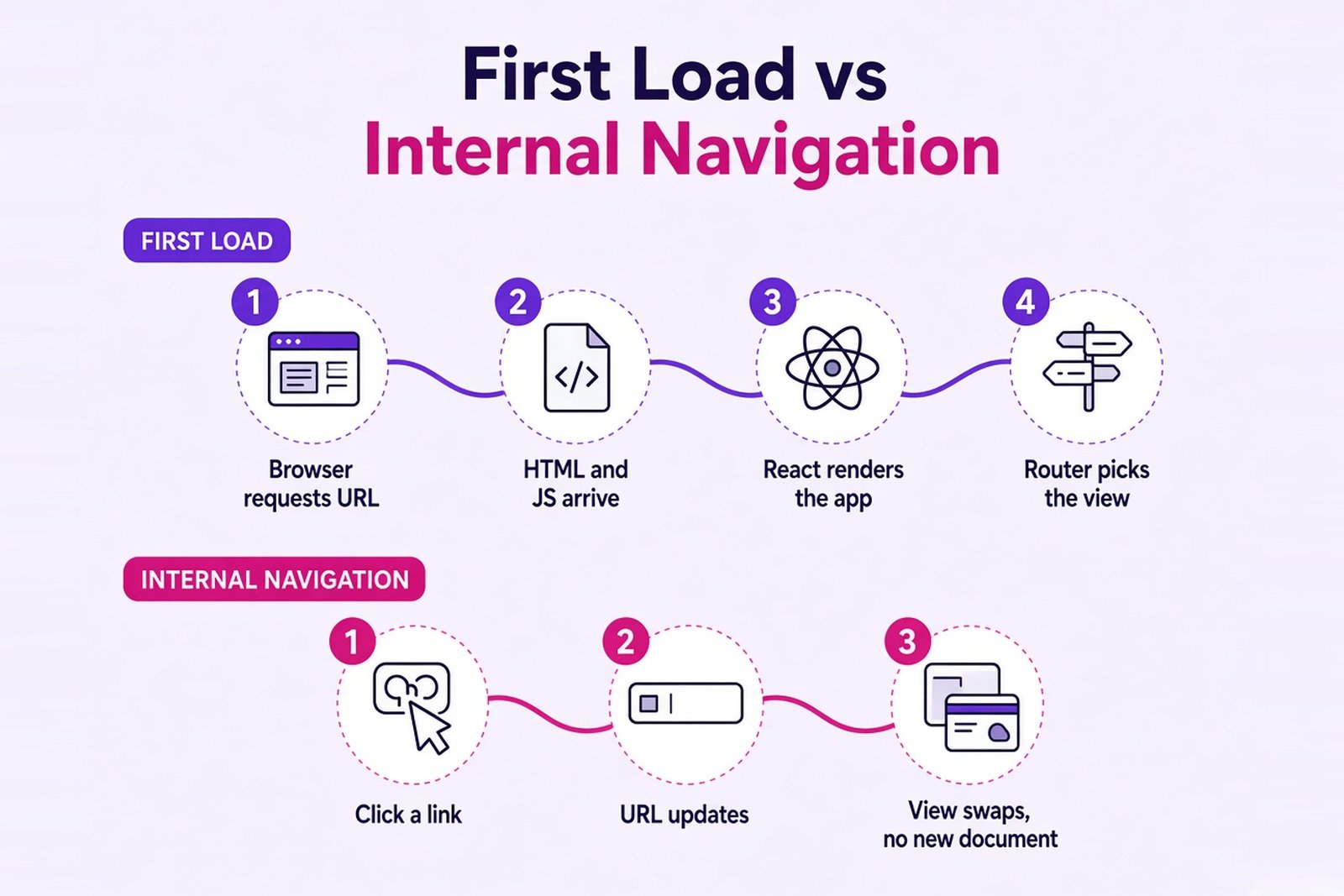
The top row happens once per visit or refresh. The bottom row is every click after that.
A few myths to drop along the way. An SPA doesn't load all its code and data once and for all - code can be split into chunks that load later, and data keeps coming from the API as people work. The server stays busy. It just sends JSON instead of full HTML pages. And the Virtual DOM isn't what makes an app an SPA; it's how React updates the screen in any architecture.
Each part of the stack has its own job:
| Part | Responsibility |
|---|---|
| React | Components and interface updates |
| Router | Mapping URLs to views, client-side navigation |
| Backend/API | Data, business rules, authorization |
| Build tool | Bundling and optimizing the app's files |
| Hosting | Serving files and answering requests for any app URL |
That last row is easy to forget. It matters more than it looks, and we'll come back to it in the deployment section.
How Can a Single Page App Have Multiple Pages?
Through routing. Each route maps a URL to a component, or to a whole tree of components. A shared layout - header, navigation, sidebar - stays on screen, and only the inner view changes. React Router renders that inner view through an <Outlet /> placed inside the layout.
Routes can carry parameters too. In /projects/42, the 42 is a dynamic segment the component reads with useParams() to load the right project. One route definition, any number of project pages.
And because every view has a real URL, the things people expect from websites keep working. The browser history records each step, so Back and Forward move between views. A link to a specific screen can be bookmarked, pasted into Slack, or sent to a colleague.
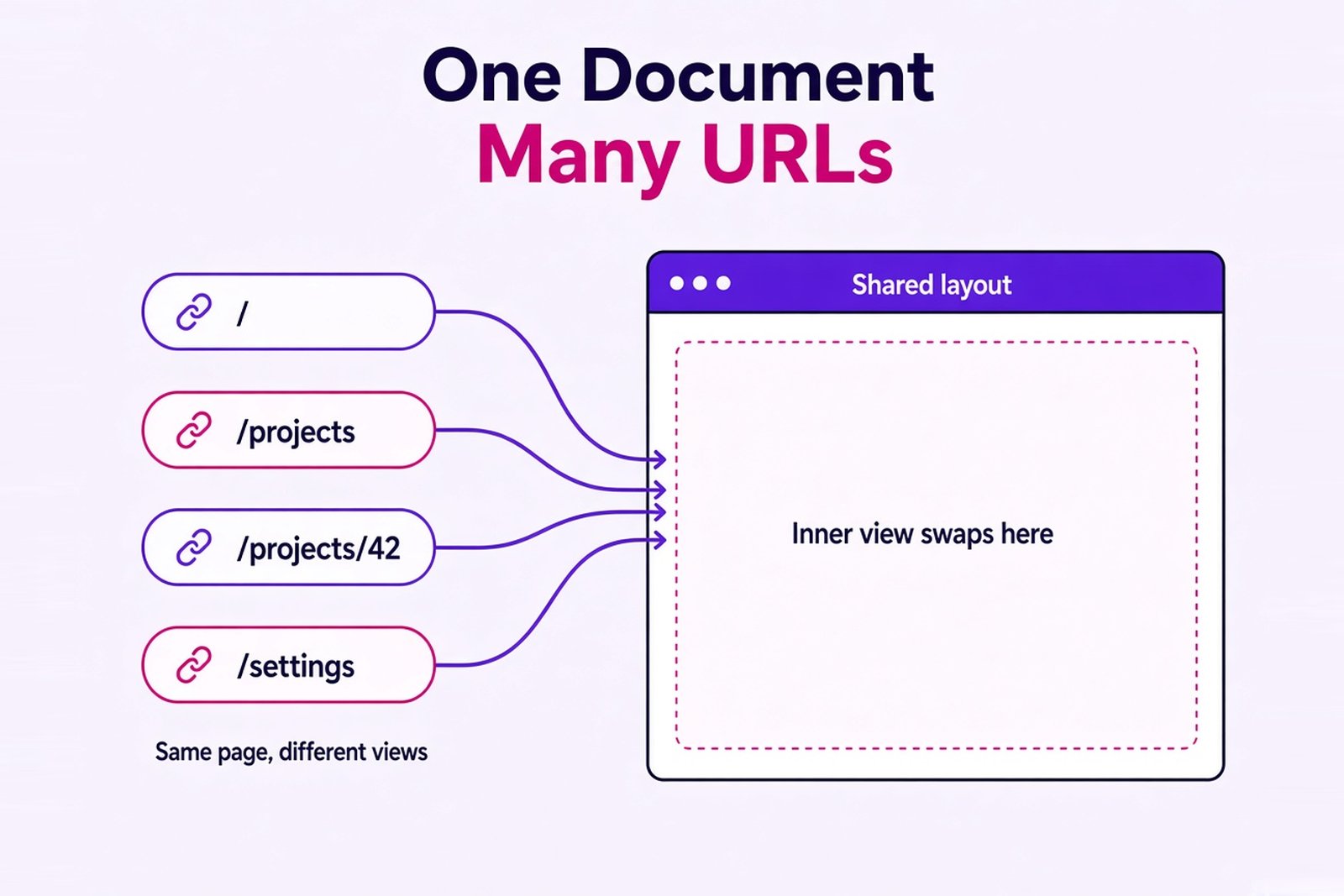
Client-Side Routing with React Router
There are two different ways to reach the same URL, and the difference matters:
| Scenario | What happens |
|---|---|
| Internal navigation through a router link | The router handles the click, updates the URL, and renders the new view in the same document |
| Direct URL visit or refresh | The browser sends a request for that address to the server |
In React Router, <Link> and <NavLink> handle the first case. They render a normal <a href> element, so crawlers and "open in new tab" still work, but they intercept the click and navigate on the client. NavLink also knows when its route is active, which is handy for highlighting the current menu item.
A plain <a> isn't wrong, by the way. Use it for external links, file downloads, or when you actually want a full page reload.
Under the hood, routers rely on the browser's History API. history.pushState() changes the URL without a request to the server. But calling it by hand doesn't notify React Router, so the view won't update - inside the app, navigate with Link or the useNavigate() hook instead.
The takeaway: multiple URLs are perfectly compatible with an SPA. Direct access to them, though, needs the right hosting setup.
React SPA vs MPA, Server Rendering, and SSG
Most confusion here comes from comparing things that live on two different axes:
- SPA vs MPA is about navigation: does moving between views swap components in one document, or load a new HTML document each time?
- CSR vs SSR vs SSG is about rendering: where and when is the HTML built - in the browser, on the server per request, or ahead of time at build time?
With that split in mind:
| Approach | What it means |
|---|---|
| SPA with client-side rendering (CSR) | The browser builds the interface; internal navigation is handled on the client |
| Multi-page application (MPA) | Navigation usually loads a new HTML document from the server |
| React with server-side rendering (SSR) | The server builds the initial HTML for each request; what happens on later clicks depends on the setup |
| React with static site generation (SSG) | HTML is built at build time; interactivity and client-side navigation can be added on top |
These rows aren't mutually exclusive. A framework can server-render the first page and then behave like an SPA for every click after that. The step that connects the two is hydration: React attaches event handlers and state to HTML that the server already sent, so the page becomes interactive without being rebuilt.
You'll also hear about React Server Components. They're a different thing from SSR - components that run on the server or at build time and send their result to the client, never shipping their own code to the browser. They need a framework that supports them, and they don't turn an app into an SPA or out of one.
So the real decision has two parts. How should navigation work? And how should the first content reach the user?
How to Build a React Single Page Application
Let's build a small but complete example: a shared layout, three main routes (/, /projects, /settings), a nested project URL, and a Not Found screen. The stack is Vite, React, and React Router in Declarative Mode. It's one concrete path, not the only right one.
Vite, Other Frameworks, and Why Not Create React App
The React team recommends starting most new apps with a framework such as Next.js or React Router in Framework Mode. All of them can also produce a client-rendered SPA. Building from scratch with a build tool like Vite makes sense when you want full control, or when you just want to see how the pieces fit together - which is exactly our goal here.
What about create react app? It was the default for years, but the React team deprecated it for new apps in February 2025. Tutorials that still start with npx create-react-app are out of date.
Installing React Router: react-router vs react-router-dom
You need Node.js 22.22 or newer - that's what React Router 8 requires. Create the project and add the router:
npm create vite@latest my-spa -- --template react
cd my-spa
npm install
npm install react-router
If the CLI offers to install dependencies and start the dev server right away, you can decline - the commands above do the same, with the router added.
Note the package name. Older guides install react-router-dom, but since v7 everything lives in react-router, and React Router 8 removed the react-router-dom package entirely. If you see it in a new tutorial, that tutorial is written for an older version.
Replace the template's demo files so src looks like this:
src/
├── main.jsx
├── App.jsx
├── Layout.jsx
├── index.css
└── pages/
    ├── Home.jsx
    ├── Projects.jsx
    ├── ProjectDetails.jsx
    ├── Settings.jsx
    └── NotFound.jsx
The entry point wraps the app in BrowserRouter, which connects React Router to the browser URL:
import { StrictMode } from "react";
import "./index.css";
import { createRoot } from "react-dom/client";
import { BrowserRouter } from "react-router";
import App from "./App.jsx";

createRoot(document.getElementById("root")).render(
  <StrictMode>
    <BrowserRouter>
      <App />
    </BrowserRouter>
  </StrictMode>
);
The Main Component: Layout and Routes
The main component, App, defines every route in one place. All routes are nested under a layout route, so the navigation stays on screen:
import { Routes, Route } from "react-router";
import Layout from "./Layout.jsx";
import Home from "./pages/Home.jsx";
import Projects from "./pages/Projects.jsx";
import ProjectDetails from "./pages/ProjectDetails.jsx";
import Settings from "./pages/Settings.jsx";
import NotFound from "./pages/NotFound.jsx";

export default function App() {
  return (
    <Routes>
      <Route element={<Layout />}>
        <Route index element={<Home />} />
        <Route path="projects" element={<Projects />} />
        <Route path="projects/:projectId" element={<ProjectDetails />} />
        <Route path="settings" element={<Settings />} />
        <Route path="*" element={<NotFound />} />
      </Route>
    </Routes>
  );
}import { NavLink, Outlet } from "react-router";
export default function Layout() {
return (
<>
<header>
<nav>
<NavLink to="/" end>Home</NavLink>
<NavLink to="/projects">Projects</NavLink>
<NavLink to="/settings">Settings</NavLink>
</nav>
</header>
<main>
<Outlet />
</main>
</>
);
}The Home Component and Other Views
The views are plain components. The home component and Settings are as simple as it gets:
export default function Home() {
  return <h1>Home</h1>;
}export default function Settings() {
return <h1>Settings</h1>;
}import { Link } from "react-router";
const projects = [
{ id: "42", name: "Customer portal" },
{ id: "43", name: "Billing dashboard" },
];
export default function Projects() {
return (
<>
<h1>Projects</h1>
<ul>
{projects.map((project) => (
<li key={project.id}>
<Link to={`/projects/${project.id}`}>{project.name}</Link>
</li>
))}
</ul>
</>
);
}import { useParams } from "react-router";
export default function ProjectDetails() {
const { projectId } = useParams();
return <h1>Project {projectId}</h1>;
}import { Link } from "react-router";
export default function NotFound() {
return (
<>
<h1>Page not found</h1>
<Link to="/">Back to home</Link>
</>
);
}Two lines of CSS in index.css highlight the current menu item, since NavLink adds an active class:
nav { display: flex; gap: 1rem; }
nav a.active { font-weight: bold; }
Run it on your local machine, then create a production build:
npm run dev      # development server at http://localhost:5173
npm run build    # production files in dist/
npm run preview  # local preview of the build
So what actually makes this an SPA? Three things. BrowserRouter listens to the URL. Routes picks the matching view. And NavLink/Link change the URL without asking the server for a new document. The end prop on the Home link keeps it from staying active on every other route, and the * route catches any URL nothing else matched.
One warning about npm run preview: it serves index.html for unknown paths by default. In our test, even a missing JavaScript file came back as HTML with a 200 status. So direct URLs work there even when they'd fail on real hosting. Test deployment on the server you'll actually use.
Data Fetching and State Management
Once routing works, the next question is where each piece of state should live. "Just put it in state" isn't an answer. There are four different kinds:
| Data | Where it fits |
|---|---|
| Whether a modal is open | Local component state (useState) |
| Filters people want to share or bookmark | URL search parameters |
| The project list from the API | Server data, loaded and cached per request |
| Interface settings used across the app | Lifted state or a shared mechanism such as Context |
Server data needs the most care. Every screen that loads it should handle three extra states: loading, error, and empty. Data also goes stale - someone else edits a project, and your copy is out of date. And when people click quickly between routes, an older response can arrive after a newer one and overwrite it. Cancel or ignore requests that belong to a view the user already left.
For anything beyond a few API calls, a dedicated server-state library like TanStack Query or SWR handles caching, refetching, and deduplication for you. Redux is also an option for complex client state, but it isn't built into React; it's a separate library. And Context shares values between components - it isn't a cache for server data.
One more thing people get wrong: state doesn't survive everything. It lives in memory, so a refresh or a direct visit clears it. If a value must survive a reload, put it in the URL, browser storage, or the backend.
The practical point: an SPA forces you to decide where each kind of state lives and how long it should last.
Deep Dive: Deploying a React SPA and Handling Direct URLs
The Vite dev server is a development tool. In production, npm run build produces static files in dist/ - an index.html and hashed JavaScript and CSS files - and any web server or CDN can serve them. You don't need a Node.js server to deploy a client-rendered SPA. The frontend and the API can live in completely different places.
Here's the classic problem. Clicking from Home to Projects works fine. Then someone refreshes /projects, or opens a shared link to /projects/42, and gets a 404.
Why? On an internal click, the router handles the URL and the server never sees it. On a refresh or direct visit, the browser asks the server for /projects/42. There's no such file in dist/, so the server says it doesn't exist. The server is looking for a file that only the client-side router knows how to handle.
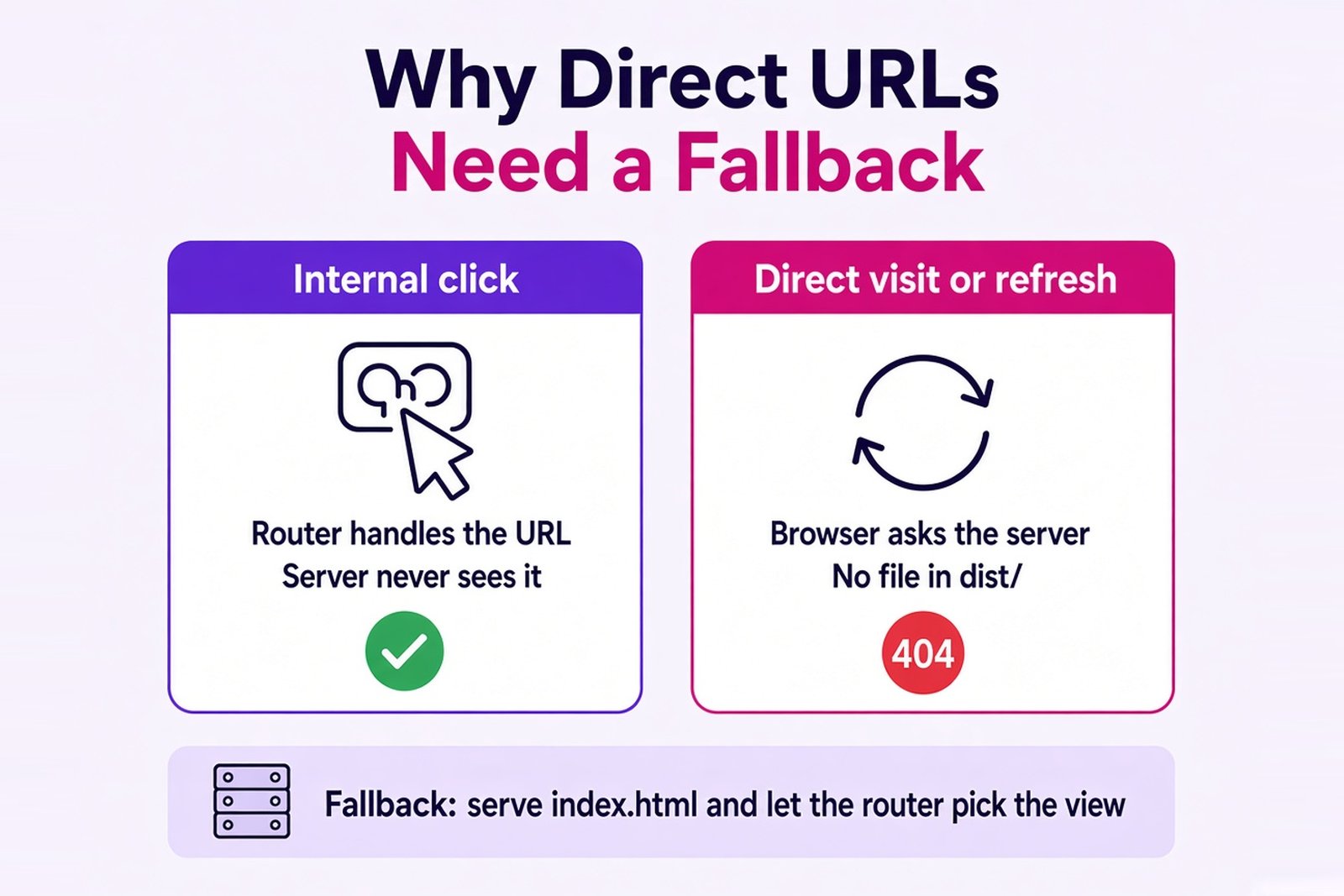
The fix is a fallback: for app routes, the server returns index.html, and React Router renders the right view. Here's an Nginx configuration we tested with the example above:
server {
    listen 80;
    root /var/www/my-spa/dist;

    # Hashed build files: serve the file or return a real 404
    location ^~ /assets/ {
        try_files $uri =404;
        add_header Cache-Control "public, max-age=31536000, immutable";
    }

    # API requests go to the backend, never to the app's HTML
    location ^~ /api/ {
        proxy_pass http://127.0.0.1:3000;
    }

    # The app shell should always be revalidated
    location = /index.html {
        add_header Cache-Control "no-cache";
    }

    # Other paths with a file extension: the file or a real 404
    location ~ \.[a-zA-Z0-9]+$ {
        try_files $uri =404;
    }

    # App routes: return index.html and let React Router pick the view
    location / {
        try_files $uri /index.html;
    }
}
The popular one-liner try_files $uri $uri/ /index.html works for routes, but it has a side effect: a missing script or image also gets index.html with a 200 status, and the browser gets a web page where it expected a script. The error that follows is confusing and easy to miss. The rules above avoid that. With this config, /projects/42 returns the app, /assets/missing.js returns 404, and /api/... always goes to the backend. The ^~ prefixes matter, by the way - without them, Nginx's regex location would take over /assets/ files.
Notice one more thing: an unknown route like /unknown/route still returns HTTP 200, and the client shows "Page not found." That's a client-side Not Found, not a real HTTP 404. For users it's fine. For search engines, see the SEO section below.
After every deployment, check three things: internal navigation, a direct visit to a nested URL, and a refresh on that URL.
React SPA Performance and SEO Considerations
Performance and search visibility are related, but they're different problems. Let's take them one at a time.
Performance
An SPA trades a heavier first load for faster clicks afterward. That trade isn't automatic in either direction - you have to measure it. Even our tiny example ships a 258.6 kB JavaScript bundle, about 82 kB gzipped, before a single feature is added (Vite 8.3.1 production build report; React, React DOM, and React Router make up almost all of it). On a fast laptop, nobody notices. On a budget phone over a weak mobile connection, downloading, parsing, and executing that code takes real time, and the user stares at an empty screen until it's done.
Things worth watching:
- the size of the initial JavaScript bundle
- code splitting:
React.lazy()with Suspense loads a route's code only when someone visits it - request waterfalls, where one component waits for data before the next one even starts loading
- API response times - a fast frontend can't hide a slow backend
- behavior on slower devices and networks, not just on a developer's machine
Measure real user flows, both the first visit and the clicks after it. An SPA isn't faster than an MPA by default, and it doesn't automatically reduce backend load either.
SEO
Google does render JavaScript, but that doesn't solve everything. According to Google's JavaScript SEO guide, what helps:
- main content that's actually in the page after rendering, not hidden behind clicks
- a separate URL for each view, using the History API rather than
#/fragments - crawlable links: real
<a href>elements, which Link renders - a unique title, description, and canonical URL for each route
- a proper answer for unknown pages - for example, redirect to a URL that returns a real 404, or add
<meta name="robots" content="noindex">to the Not Found view
For public pages that must rank, server rendering or pre-rendering is often worth it: the HTML arrives ready, and not every crawler runs JavaScript.
But notice who needs this. A logged-in dashboard doesn't need organic search traffic at all. Public landing pages and a blog do. Those two parts of a product can - and often should - be built differently.
Production Considerations Beyond Routing
A working router is maybe half of a production-ready SPA. The rest:
- Authorization lives on the server. Hiding a button or wrapping a route in a "protected route" component only changes what's displayed. Every API request still has to check who's asking and what they're allowed to see.
- Security depends on your setup. React escapes text rendered in JSX, which helps against XSS, but it has no built-in CSRF protection - that depends on how you authenticate and how the backend is built.
- Focus management. After a client-side navigation, focus stays where it was, and screen reader users may not notice the page changed. Move focus to the new heading or announce the change.
- Accessible status messages for loading and errors, not just spinners.
- Failure handling. An error boundary keeps one broken widget from blanking the whole app.
- Analytics. Client-side navigation doesn't trigger a page load, so page views have to be reported on route changes.
- End-to-end tests for the main user flows, including direct visits and Back/Forward - the checks that ran against the example in this guide.
When Should You Use a React SPA?
The type of site gives you a starting point, not an answer. Look at what each scenario actually needs:
| Scenario | What to evaluate |
|---|---|
| Dashboard or internal tool | How often people interact, how much data they work with, how much state the screens share |
| Customer portal | Navigation depth, access rights, forms, long user sessions |
| SaaS application | How the public marketing site and the working interface are split |
| Blog or content site | Indexability, first load speed, whether JavaScript is needed at all |
| Online store | Separate needs for the catalog, product pages, search, cart, and account |
One product can mix approaches, and many good ones do. Public pages get prepared HTML for speed and search. The logged-in app behind them works as an SPA, where long sessions and fast clicks between views matter more than the first load.
When you're deciding, these questions do most of the work:
- How interactive is the interface, really?
- Do specific routes need organic search traffic?
- What devices and networks does your audience use?
- How is the backend built, and does it already expose an API?
- Which stack can the team support for years, not just for launch?
- How much complexity do the requirements justify?
If you're planning a React interface, Softellar's React development services cover SPAs, server rendering with Next.js, and performance work. For broader architecture - frontend, API, and infrastructure together - see our web application development services.
A real example: for HostMy, a U.S. telecommunications company, our team re-architected a legacy React SPA.
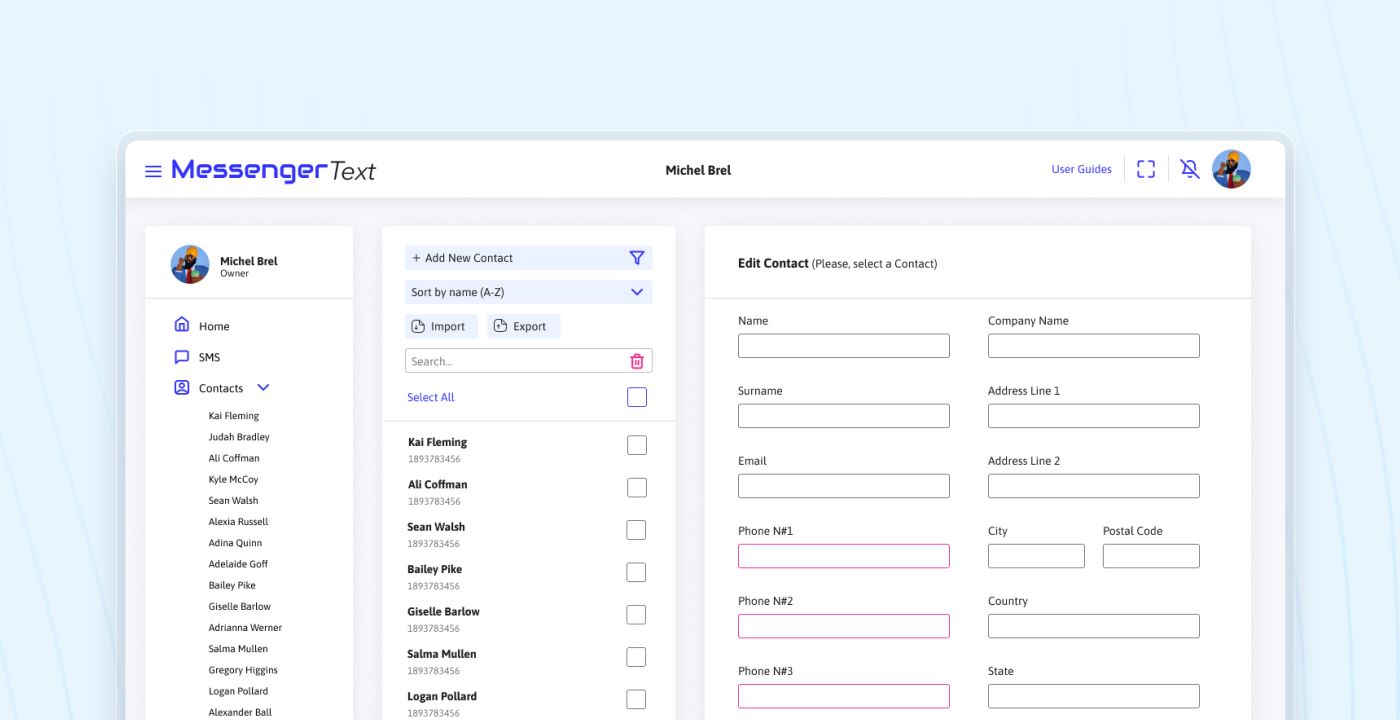
See Our Real React SPA Case Study
Re-architected into a modular, component-driven codebase, migrated it to TypeScript, and added unit tests and Storybook documentation for the UI components. The app stayed an SPA. What changed was how it was organized, tested, and maintained.
Choosing the Right Architecture
React is a solid fit for single page applications, but React alone doesn't make an app an SPA, and an SPA isn't always the right call. The choice depends on how navigation should work, what data the screens need, how fast the first load must be, and whether search engines need to see the content.
Planning a new React application or struggling with an existing frontend? Talk to Softellar. We'll look at your product, users, and constraints, and help you choose an architecture that fits. We won't recommend an SPA just because it's popular.