
Software Development Life Cycle (SDLC): Phases, Models, and How to Choose
Software development projects rarely fail on the code itself. They fail in the handoffs: a requirement that two people understood differently, a defect found the week before launch, a decision nobody knew they were supposed to make. Development teams need an agreed order of work, and a few points where they stop and decide whether to go on. That agreement is what people call the software development life cycle, or SDLC.
This guide explains what the SDLC is and how it differs from the systems development life cycle, which phases most teams go through and what each one produces, how the main models arrange those phases, and how to choose between them. It also covers how the cycle works with CI/CD, security, and AI assistants, how to tell whether your process is healthy, and why it sometimes turns into paperwork. One invented project, an online booking portal for an equipment-rental company, runs through the article to keep the ideas concrete.
What Is the Software Development Lifecycle?
The software development lifecycle (SDLC) is the sequence of stages a piece of software goes through, from the first idea to the day it is retired. Every team has one, even if nobody wrote it down. Writing it down helps people agree on who decides what, and on what has to be true before the work moves on.
It helps to be clear about what the SDLC is not. It does not tell a team how to work day to day. It names the stages and what each should produce, and a model such as waterfall or agile decides how those stages are arranged in time. That makes the SDLC a structured framework for thinking about the work, not a methodology you adopt. People also call the same thing the software development process, and the difference is only one of emphasis: the SDLC names the stages, while a model arranges them. Guides write the term as "life cycle" or "lifecycle". It means the same thing, and this article uses both.
How many stages are there? Guides count anywhere from five to nine. This article uses seven commonly described phases: planning, analysis, design, development, testing, deployment, and maintenance. The sections below describe each one.
Software vs System Development Life Cycle
The abbreviation SDLC also stands for the systems development life cycle, and the two get mixed up. International standards keep them apart. ISO/IEC/IEEE 12207, updated in 2026, describes software life cycle processes, and ISO/IEC/IEEE 15288, updated in 2023, describes system life cycle processes. Which one fits depends on what you are building.
A system is wider than its software. It can include hardware, operating systems, networks, data, and the people and procedures around them, plus training, change management, and eventual disposal. When a company rolls out a new warehouse system, the software application is only one piece: scanners, networks, and the training of the people who use them matter just as much. A system development project therefore carries activities that sit outside code.
| Term | Scope | Where you meet it |
|---|---|---|
| Software development life cycle | The software itself, from idea to retirement | Product and engineering teams |
| Systems development life cycle | Software plus hardware, networks, data, people, and business processes | IT programs, infrastructure projects, public-sector work |
| Application lifecycle management (ALM) | The whole life of an application, which can contain several SDLCs | Long-lived products |
Some sources also use "application development life cycle" for the same idea as the SDLC. This article is about the software side. The standards add one more point worth remembering: their processes can run concurrently and iteratively, so in real projects the stages overlap.
Why Teams Use It, and When It Backfires
Teams use an SDLC to make software work predictable enough to plan and check. It gives everyone the same picture of what happens next, where problems are likely to surface, and who is responsible for each stage. It also gives project managers something concrete to track progress against.
Used well, it helps in four specific ways:
- A shared picture. Requirements, design decisions, and test results live in documents everyone can read, so people do not depend on memory.
- Earlier risk management. Asking for a threat model at the design stage is usually cheaper than discovering a weakness after release.
- Control of scope and quality. The scope is written down, changes become visible, and testing is a planned step, not an afterthought.
- Better planning. Each stage can be estimated for cost and time. Those estimates change as the team learns, so treat them as a current best guess, not a promise.
On complex projects with many stakeholders, this shared structure matters even more, because it is what keeps customer expectations and engineering work pointing at the same target.
The SDLC backfires when it turns into a checklist. The signs are familiar: documents written to satisfy the process rather than to answer a question, testing squeezed into the last days, performance and security remembered late, users and the business rarely consulted, and roles that exist on paper while nobody feels responsible. The fix is the same each time. Ask what a stage is supposed to learn or decide, and drop the ceremony that does not serve that. We come back to this in the section on why the SDLC fails.
The Seven Key Phases of the SDLC
Many guides describe seven key phases: planning, analysis, design, development, testing, deployment, and maintenance. The output of each phase becomes the input of the next, so a gap in the previous phase shows up later as a surprise. The count is not fixed. Some guides use five phases and others nine, and the same stage can go by different names: analysis is often called requirements, and development is also called implementation or coding. We use the seven-phase version because it is widely described and maps easily onto the other counts.
In practice the phases overlap and loop. ISO/IEC/IEEE 12207 describes its processes as ones that can be applied concurrently, iteratively, and recursively, and an agile team passes through all seven phases inside a single short iteration.
Our running example. To keep things concrete, we follow one invented project. A regional equipment-rental company with several branches takes bookings by phone and in spreadsheets kept at each branch. It wants customers to check availability and book equipment online. The portal will take online payments and hold personal data, and the busy season starts in spring. The team is a product owner from operations, a project manager, six engineers, a QA engineer, and a DevOps engineer. Everything about this company is made up.
SDLC Phases at a Glance
| Phase | Who usually leads | Typical artifact | Question to answer before moving on |
|---|---|---|---|
| Planning | Product owner, project manager | Project plan, feasibility summary | Is this worth doing now, and within what scope? |
| Analysis | Business analyst, product owner | Requirements specification | Do stakeholders agree on what "done" means? |
| Design | Architect, tech lead | Design document, prototype, threat model | Does the design cover every requirement and every known security risk? |
| Development | Software engineers | Working code, unit tests | Does the build match the design and pass the automated checks? |
| Testing | QA engineers | Test report, defect list | Do integration, system, and acceptance tests pass against criteria agreed in advance? |
| Deployment | DevOps engineer, release manager | Production release, rollback plan | Is the release running as expected, and can we roll it back? |
| Maintenance | Engineers and support | Patches, updates, monitoring reports | Are problems being handled, and what is the next change? |
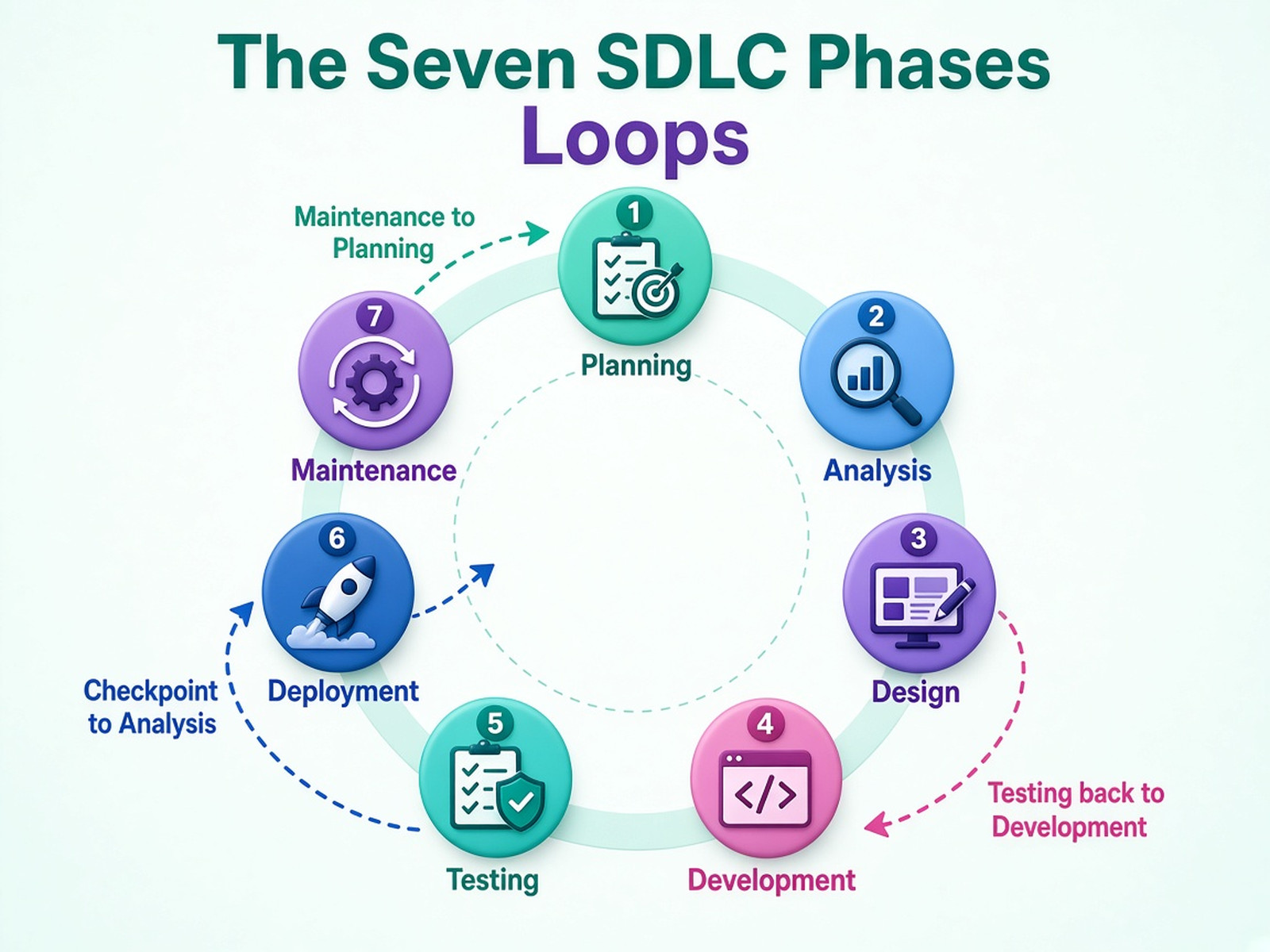
The diagram shows the three loops real projects have: testing sends defects back to development, a checkpoint can send the work back to analysis, and maintenance feeds the next round of planning.
The question in the last column of the table is a checkpoint. The people who own the budget and the risk decide whether to go on, rework, pause, or stop. The idea comes from the Stage-Gate process, which companies use to manage product development. Applying it between SDLC phases is our suggestion, not part of the definition of the SDLC.
Planning Phase
The planning phase decides whether the project should exist and what it covers. The team states the goals, writes down the project scope, checks feasibility (can we build it, can we afford it, will the business actually use it), and makes a cost and time estimate. The result is a project plan that project managers and the product owner can track progress against. The usual risk is scope creep, where requirements keep growing beyond the plan. Estimates made now are a best guess, so expect to update them as the next phases teach you more.
In the booking portal, planning ends with a short document: customers should be able to check availability and book online instead of phoning a branch, the first release covers booking and payment only, and the busy season in spring sets the deadline. The checkpoint approves that scope.
Analysis Phase
The analysis phase turns a goal into requirements. The team gathers user requirements by talking to the people who will use the product, does market research where it matters, and records system requirements: what the software must do, and how fast, how secure, and how reliable it must be. That last group, the non-functional requirements, is the one teams most often forget. The output is a requirements specification. Poorly defined requirements are among the most common reasons a release slips, because the gaps show up only when someone tries to use the result. Teams often bring in a business analyst to run this phase.
In the booking portal, this is where the first problem appears. Operations count equipment standing in the yard as "available". Finance counts equipment that is neither reserved nor in maintenance. The two definitions give different answers, and the portal needs one. The checkpoint sends the analysis back for rework until the departments agree.
Design Phase
The design phase decides how the software will meet the requirements. Engineers define the system architecture, the major software components and how they connect, the database, and the user interfaces, and they check how the new software fits with the systems around it. A prototype lets users react before anything is built. This is also the cheapest moment to ask how the system could be attacked: threat modeling lists the risks and decides which controls the design needs. The output is a design document, with a prototype and a threat model. Teams that want an outside view on this step can look at software architecture services.
In the booking portal, threat modeling shows that storing card data would turn the system into a target. The team decides to hand payments to a payment provider, so the portal does not need to store card numbers.
Development Phase
In the development phase, which some guides call the implementation phase or coding, software engineers write the code. Good teams do not treat this as solo work: code reviews, version control, and unit testing, which checks the smallest pieces of code in isolation, happen while the code is written. The team picks development tools that fit the design and the people who will maintain the result. With continuous integration, every change is built and checked automatically, as the CI/CD section below explains. The output is working code with its unit tests, ready to be tested as a whole.
In the booking portal, the team builds in short iterations: availability and booking first, then payment integration. Notifications stay in the backlog for a later release. Each iteration ends with something the product owner can try.
Testing Phase
The testing phase checks that the software does what the requirements say and finds defects before users do. The team runs unit tests, integration testing (do the pieces work together?), system testing (does the whole product work in a realistic environment?), and user acceptance testing, where representatives of the users confirm the product meets their needs. Security testing looks for security flaws an attacker could use. QA engineers usually lead this phase, and developers fix the bugs it finds, after which the affected tests run again. Testing finds defects but cannot prove there are none, so the team agrees in advance what "good enough to release" means. Many teams now test continuously instead of leaving it for the end, an approach known as shift-left testing. A dedicated quality assurance team is one way to staff it.
In the booking portal, integration tests show that two customers can book the same machine at the same moment. The defect goes back to development, and the booking tests run again.
Deployment Phase
The deployment phase moves tested software into the production environment, where real users work with it. The team prepares the release, trains users and support staff, writes the documentation, and decides how to switch over. Releases usually go out in stages: first to a pilot group, then to a beta group or a small share of users (a canary release). The team also agrees on a rollback plan, which says how to return to the previous version if something goes wrong. When a new system replaces an old one, the choice is between a direct changeover and a parallel run, where old and new work side by side for a while. Done well, software delivery becomes a routine: the same steps and the same checks every time.
In the booking portal, the team releases first to one branch. Staff there watch for problems, and the other branches follow once the pilot looks healthy.
Maintenance Phase
The maintenance phase starts the day after release and lasts as long as the software is used. The team fixes bugs found in production, applies patches and updates, watches performance and security, and adds improvements. Maintenance also needs protecting. Updates can be an attack route: in 2020, attackers compromised SolarWinds Orion software through its supply chain, as the CISA advisory on the incident describes, and customers received the malicious code in routine updates. For that reason updates deserve the same security checks as the first release.
Eventually software stops being worth maintaining as it is. At that point teams either modernize it or retire it. Legacy application modernization covers the options, and What Is Application Modernization? explains the strategies and the process.
In the booking portal, the first weeks after launch bring monitoring, a few fixes, and questions to support. Each request goes back to planning as a candidate for the next change.
SDLC Models: How Teams Arrange the Phases
The SDLC says which stages a project has. An SDLC model says in what order they run, how much they overlap, and when the team goes back. Software development models range from strictly sequential to fully iterative, and the popular SDLC models differ mainly in how they deal with change.
| Model | Best for | Flexibility | Main risk |
|---|---|---|---|
| Waterfall | Stable, well-understood requirements | Low | Going back to a finished phase is costly |
| Iterative | A known core with details still to refine | Medium to high | Scope drift and underestimated effort |
| Spiral | Large projects where risk is high | High | Expensive for small projects |
| V-model | Stable requirements where each step must be verified | Low | Rigid when requirements change |
| Agile | Changing requirements and stakeholders who can give frequent feedback | High | Needs disciplined communication, and scope can keep shifting |
| Rapid application development | Fast prototypes and quick user feedback | High | Less up-front planning |
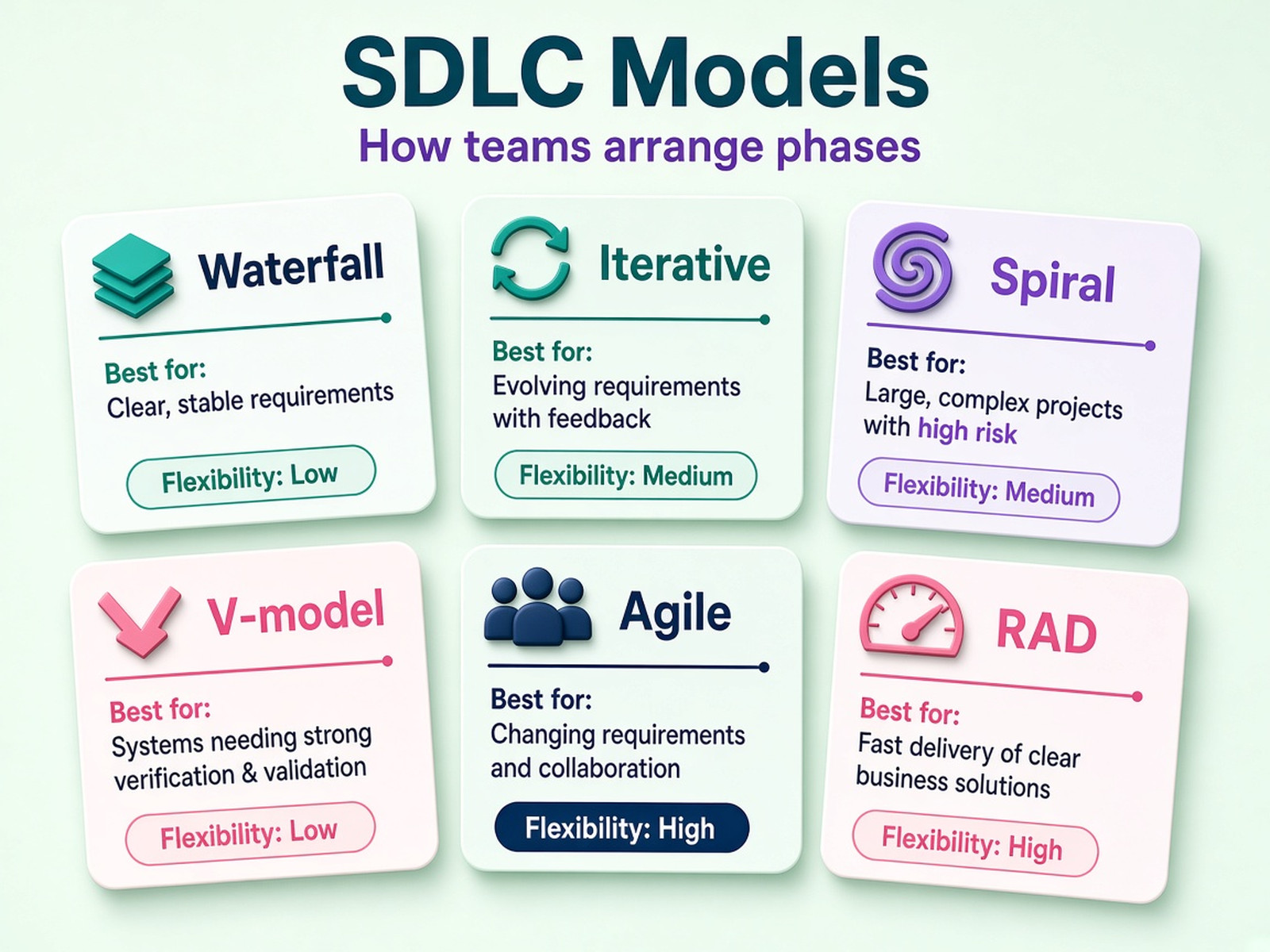
Waterfall Model
The waterfall model is a linear, sequential approach: each phase finishes before the next begins. It suits traditional software development, where requirements are clear and unlikely to change and stakeholders want to review only at major milestones. The cost is flexibility. If a problem turns up late, going back to a finished phase takes time and money. Many later models grew out of it.
Iterative Model
In the iterative model, the team quickly builds an initial version, often a minimum viable product, and improves it through repeated cycles. This iterative development process works when the core idea is clear but the details are not, because every version produces feedback for the next one. The risks are scope drift, since each cycle invites new requests, and underestimating how many cycles the work needs.
Spiral Model
The spiral model repeats four steps in every loop: set objectives, analyze resources and risks, build and test, and plan the next loop. The focus on risk makes it a fit for large, complex projects where changes are expected. On small projects the repeated risk analysis can cost more than it saves.
V-Model
The V-model is a variation of waterfall in which every development phase has a matching testing phase. In a typical V-model, requirements correspond to acceptance testing, system design to system testing, architectural design to integration testing, and detailed design to unit testing. It works well when requirements are stable and frequent verification matters, and it is as rigid as waterfall when they are not.
Agile Model
The agile model arranges the phases into short cycles, often called sprints, each delivering a small, working piece of the product. Agile is a software development methodology, not a stage of its own, and it is not the opposite of the SDLC: it is one way to run the same phases many times in small pieces. Scrum and Kanban are common ways to organize the work. Scrum uses time-boxed sprints, and Kanban uses a continuous flow shown on a board. Lean applies a similar spirit by cutting waste from each step. Agile asks for regular conversations with users, which is both its strength and its demand. If you are building the team, a Scrum team is one common setup.
Rapid Application Development
Rapid application development (RAD) relies on quick prototypes and user feedback instead of a long planning period. The team shows users a working draft early and reshapes it based on their reactions. It fits projects where users can review often. The trade-off is less up-front planning, so it takes discipline to avoid drifting.
DevOps and the SDLC
DevOps is often listed next to the models, but sources disagree on whether it is one. IBM describes it as a combination of practices, tools, and cultural habits rather than a single model, while Atlassian lists it as a model. Either way, the idea is clear: bring development and operations teams together and automate the path from code to production, so the phases run continuously instead of as separate handoffs. The next sections show how that looks in practice.
How to Choose the Right SDLC Model
Choose a model by asking a few honest questions about the project, not by picking the fashionable name. The answers pull toward more up-front planning or more iteration, and many teams end up somewhere in between. Six questions are enough to start with:
- How clear and stable are the requirements? Clear and stable ones point toward waterfall or the V-model. Unclear or moving ones point toward iterative or agile. This is also where customer expectations matter: if the customer cannot yet say what they want, a long fixed plan will not help.
- How costly is a late change? If a change after release is very expensive, as in regulated or safety-related software, plan more up front.
- How risky is the project? High risk and high uncertainty favor spiral-style cycles with an explicit risk review each time round.
- Can users give frequent feedback? If they can, agile or RAD pays off. If users are rarely available, their feedback cannot drive short cycles.
- How experienced is the software development team? Iterating without a detailed plan assumes people who are comfortable making decisions on their own.
- How often must you release? Frequent releases need automation, which points toward DevOps practices.
Hybrid approaches are common, especially on complex projects: agree scope, requirements, and architecture up front, then build and test in short iterations. That is what the booking-portal team does. Payments and personal data justify careful design, while the booking features benefit from quick feedback from the branches.
Do not choose by slogan. "Agile is better" and "waterfall is outdated" both ignore the project in front of you. A model can also be changed mid-project, and reviewing the choice at each checkpoint costs little.
The SDLC in a CI/CD World
In teams that practice continuous integration and continuous delivery (CI/CD), the phases stop being stages on a calendar and become activities that happen on every change. Each change is built, tested, and prepared for release automatically, so planning, testing, deployment, and maintenance run side by side.
What does not go away is the thinking behind each phase: requirements, design decisions, ownership, and the conditions for moving work forward. They move into the pipeline. A test suite that must pass before a change is merged is an exit criterion made automatic. Testing earlier in the process, known as shift-left testing, gives developers feedback while the code is still fresh, and integration testing on every change catches problems that used to appear only at the end. DevOps brings development and operations teams together, so the people who build the software also share responsibility for running it in the production environment, and what they see in production feeds the next round of planning. A DevOps team often owns the pipeline and the environments behind it.
To keep control, decide which automated checks block a release and who decides when a check fails and the team still wants to ship. Write both down. Without that, the pipeline becomes a faster way to ship the same confusion.
Security in the SDLC
Security belongs in every phase, not in a test just before launch. DevSecOps puts automated security checks into the delivery pipeline, so problems are found while they are still cheap to fix.
| Phase | Security activity |
|---|---|
| Analysis | Security and compliance requirements, classification of the data involved |
| Design | Threat modeling and security controls in the architecture |
| Development | Secure coding practices and automated code scanning |
| Testing | Static and dynamic analysis (SAST and DAST), penetration testing |
| Deployment | Careful handling of configuration, secrets, and access |
| Maintenance | Monitoring, timely patching, protection of the update process |
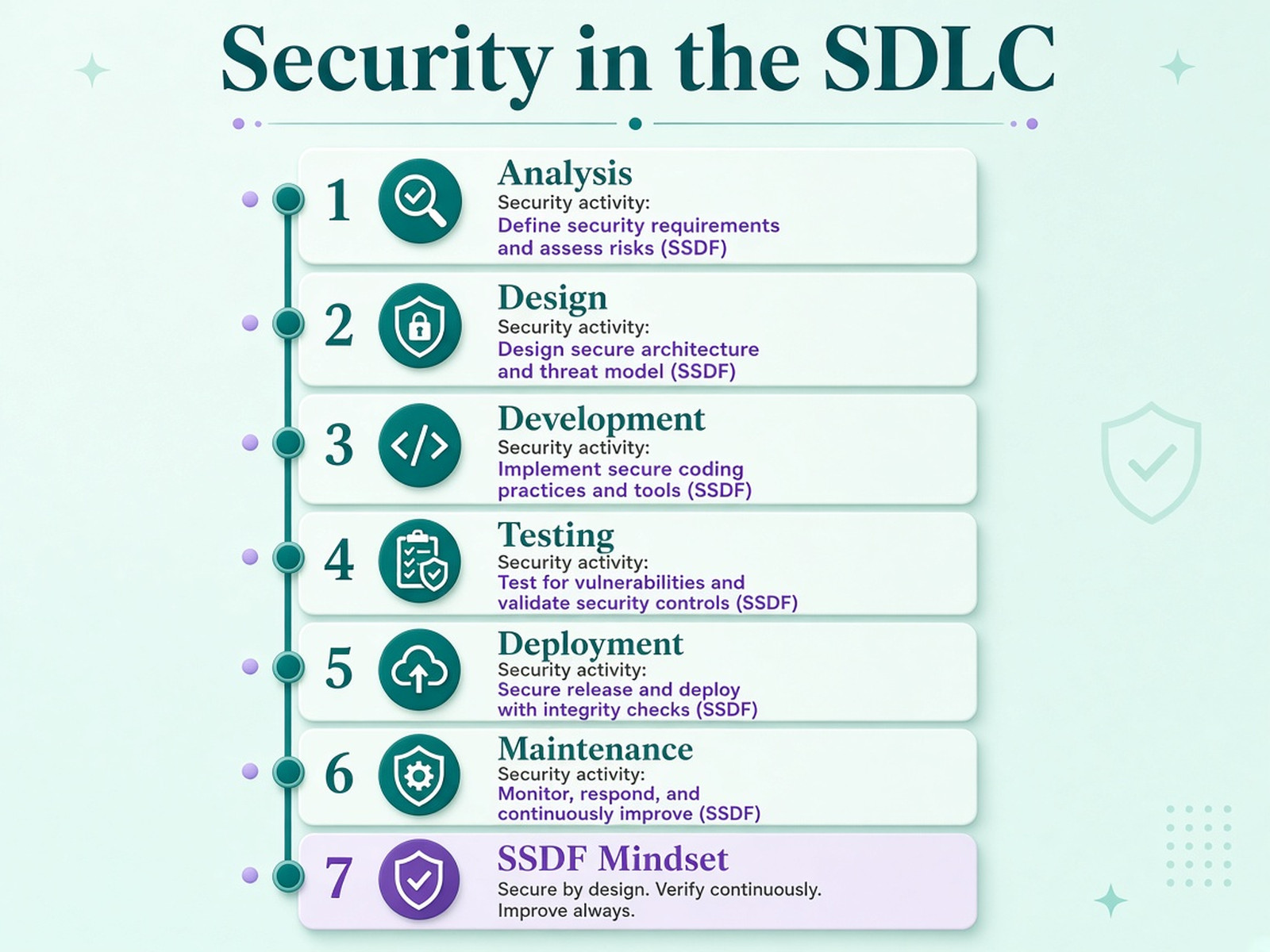
For a current reference, use the Secure Software Development Framework from NIST, SP 800-218. It is a core set of high-level secure development practices that can be integrated into any SDLC implementation, and the practices fall into four groups: prepare the organization, protect the software, produce well-secured software, and respond to vulnerabilities. NIST has also published a draft of the next revision, published in December 2025, so check which version is current before you cite it. Older material still circulates. NIST withdrew SP 800-64 Rev. 2 in 2019, so do not treat it as current guidance.
The build and update process deserves protection too, because that is what the SolarWinds incident exploited. In the booking portal, threat modeling at the design phase led to a simple decision: do not store card data. That choice significantly reduced the portal's exposure to payment-card data risks, although the payment integration still needed security checks.
AI in the SDLC
AI assistants can speed up parts of the work, but their output goes through the same checks as anyone else's. The SDLC is where those checks live.
They already help in concrete places. In analysis, an assistant can summarize user feedback and point out gaps in the requirements. In design, it can draft a prototype. In development, it can draft code and explain errors. In testing, it can propose test cases and find patterns in failures, and in maintenance it can read logs for anomalies.
The risks are just as concrete. Generated code can be wrong or inefficient, and defects it introduces can sit unnoticed until late. Writing code faster can also move the effort to verification: reviewing and testing generated code takes human time, and it can eat the saving. IBM's SDLC guide discusses this trade-off.
Treat generated code like any other contribution. Review it, test it, and pass it through the same quality assurance gates. The engineer who commits it stays responsible for it. Agree in advance what may be pasted into an assistant, because source code and customer data call for different care. Adoption figures change quickly, so check a recent survey before quoting any number.
In the booking portal, engineers use an assistant to draft tests for the booking rules, and a reviewer reads every generated test. The overlapping-booking defect is still caught by the integration tests, not by the assistant.
How to Measure SDLC Health
A healthy SDLC shows up in a few measures of speed and stability, not in the number of tickets closed. Pick a small set, record a starting level, and review the numbers at the same checkpoints where you decide whether to go on.
| What to watch | What it shows | Where it comes from |
|---|---|---|
| Change lead time (DORA) | How long a change takes to get from commit to production | Version control and the pipeline |
| Deployment frequency (DORA) | How often the team releases | The pipeline |
| Failed changes and recovery time (DORA stability measures) | How stable releases are and how quickly the team recovers | Incident records |
| Defects found after release compared with before | How well testing catches problems | The issue tracker |
| Requirement changes after analysis | How well analysis captured the need | The issue tracker |
| Reopened tickets | The quality of handoffs between phases | The issue tracker |
DORA, the DevOps Research and Assessment program, defines a small set of software delivery metrics that cover throughput and instability, including change lead time and deployment frequency. Read them together, because speed without stability helps nobody. Take the definitions from dora.dev, since the set has changed over time, and be wary of tables of "elite" and "low" performers that get copied from one article to the next.
These measures describe the process, not the product. A team can ship reliably something nobody wants, so pair them with a product measure, such as how many customers use the booking portal a month after launch. They also help development teams track progress between phases: a rising number of requirement changes after analysis is an early signal that the analysis missed something.
Why the SDLC Fails, and How to Spot It Early
Following an SDLC does not guarantee a good result, and teams that treat it as a checklist often get a poor one. The process fails when people go through the steps without the thinking the steps are meant to prompt.
| Cause | Early warning sign | What to do |
|---|---|---|
| Poorly defined requirements | Rework after analysis, and different people describe "done" differently | Write acceptance criteria and have stakeholders confirm them at the checkpoint |
| Scope creep | The backlog keeps growing and dates slip | Agree who approves changes to the project scope and what is dropped to make room |
| Documents as the goal | Documents get produced, nobody reads them, and assumptions are never tested with users | Keep documents short and test the assumptions with real users |
| Late or rushed testing | Testing is squeezed into the last days, and users find the bugs | Test alongside development and protect the time |
| Testing without an end | Rounds of extra testing keep delaying the release | Agree exit criteria for testing in advance |
| Forgotten non-functional requirements | Performance, security, or scalability worries appear near launch | Put them into the requirements and the design |
| Rigid execution | The process is followed to the letter even though circumstances changed | Review the model at each checkpoint |
| Unclear ownership | Roles exist on paper, but nobody answers for the outcome | Name an owner for each phase |
The earlier a sign shows up, the cheaper the fix. That is why checkpoints matter: each one is a chance to catch a sign while it is small. A project that runs slower than planned is not necessarily a failed one, but a project where nobody asks why is heading there.
SDLC Example: An Online Booking Portal
This example is illustrative. The company and every detail are invented, and the outcomes are not real results. The table follows the booking portal from the planning phase to launch and shows what each checkpoint decided and why.
| Phase | What happened | Checkpoint decision | Why |
|---|---|---|---|
| Planning | Goal and first-release scope agreed: check availability and book online, payment included, notifications later. Spring sets the deadline | Go on | The scope is clear and the deadline is realistic |
| Analysis | Operations and finance define "available" differently | Rework | A portal built on two definitions would show the wrong equipment. The departments agree on one definition and record it in the requirements |
| Analysis, second pass | One definition written into the requirements | Go on | Stakeholders confirm what "done" means |
| Design | The system architecture is agreed. Threat modeling shows the risk of storing card data | Go on, with a change | Payments go to a payment provider, so the portal does not store card numbers |
| Development | Built in short iterations: availability and booking first, then payment integration. Notifications stay in the backlog for a later release | Go on | Each iteration is demonstrated, and unit tests pass |
| Testing | Integration tests show that two customers can book the same machine at once. Staff from one branch run user acceptance testing | Rework, then go on | The defect goes back to development and the tests run again |
| Deployment | Pilot at one branch, then the other branches, with a rollback plan ready | Go on in stages | The pilot shows normal operation in the production environment |
| Maintenance | Monitoring and fixes in the first weeks, questions go to support | Continue | Requests feed the next round of planning |
Two checkpoints did most of the work. The first stopped the team from building a software application on two meanings of "available". The second sent a defect back to development before any customer saw it. Neither needed a heavy process. Each needed one question asked at the right moment: do we agree on what "done" means, and do the tests pass against what we agreed?
SDLC Checklist
Before a software project starts, check the basics. If several are missing, spend a few days on them first.
- Each phase has a named owner.
- The scope is written down.
- Requirements, including non-functional ones, are agreed with stakeholders.
- Each phase has an exit criterion: a question to answer before moving on.
- A model is chosen, and the reason is written down.
- Security requirements are listed, and threat modeling is planned.
- Test environments and a test strategy exist.
- A release plan and a rollback plan exist.
- Monitoring and support after launch are planned.
- Starting levels are recorded for the measures you will track.
Conclusion
The SDLC is an agreement about the order of work and about what must be true before work moves on. The model you pick matters less than whether those conditions are clear and whether the team is willing to send work back when they are not met. A phase table, an owner for each phase, and one question at each checkpoint will do more for a project than a thicker process document.
If you do one thing this week, name an owner for each phase of your current project and write down the question that must be answered before the next phase starts.
Sources
- IEEE Standards Association, ISO/IEC/IEEE 12207:2026, Systems and software engineering: Software life cycle processes
- BSI, ISO/IEC/IEEE 15288:2023, Systems and software engineering: System life cycle processes
- NIST, SP 800-218, Secure Software Development Framework (SSDF) Version 1.1, February 2022
- NIST, SP 800-218 Rev. 1, initial public draft
- NIST, Withdrawal of SP 800-64 Rev. 2, 2019
- DORA, Software delivery performance metrics
- CISA, Alert AA20-352A, Advanced Persistent Threat Compromise of Government Agencies, Critical Infrastructure, and Private Sector Organizations, December 2020
- IBM, What is the software development lifecycle (SDLC)?
- AWS, What is SDLC?
- TechTarget, What is systems development life cycle?