
Infrastructure as Code: A Practical Guide to Tools and Getting Started
Two years ago, someone set up your production environment by hand, clicking through a cloud console over a few late evenings. They've since left the company. The staging environment is "almost the same" as production, which everyone knows means it isn't. When a new customer needs a copy of the system, the estimate is three weeks, most of it spent working out what is actually configured where.
Infrastructure as code (IaC) is the practice of defining servers, networks, databases, and permissions in code files, keeping them in version control, and applying them with a tool instead of configuring each piece by hand.
This guide explains how IaC works, how the main tools differ, how to choose one, and how to move an environment that already exists to code without breaking it. Along the way, we'll be honest about what it costs.
What Is Infrastructure as Code?
Infrastructure as code, often shortened to IaC, means managing infrastructure through configuration files that a tool reads and applies, instead of clicking through a console or running one-off commands. The infrastructure here is everything an application runs on: virtual machines, networks, load balancers, databases, cloud storage, permissions, Kubernetes clusters, and resources in SaaS services that offer an API. In DevOps, this is the layer that development and operations teams have to build and keep running together.
The easiest way to see the difference is to compare a written recipe with cooking from memory. A cook who works from memory gets close to the same dish each time, but not quite, and the knowledge leaves with the cook. A written recipe can be handed to anyone, improved through a reviewed change, and used in another kitchen. IaC is the written recipe for your environment.
In practice, that gives you three things you don't get from console work. The definition lives in version control, so every change has an author, a date, and a reviewer. The same definition can create a development, a test, and a production environment. And the code doubles as documentation, because it describes what was actually built, as long as nobody edits the environment by hand.
A few terms come up again and again, and the next section explains each: provisioning (creating resources), state (the tool's record of what it manages), drift (when reality and code stop matching), and idempotency (running the same code twice gives the same result).
How Infrastructure as Code Works
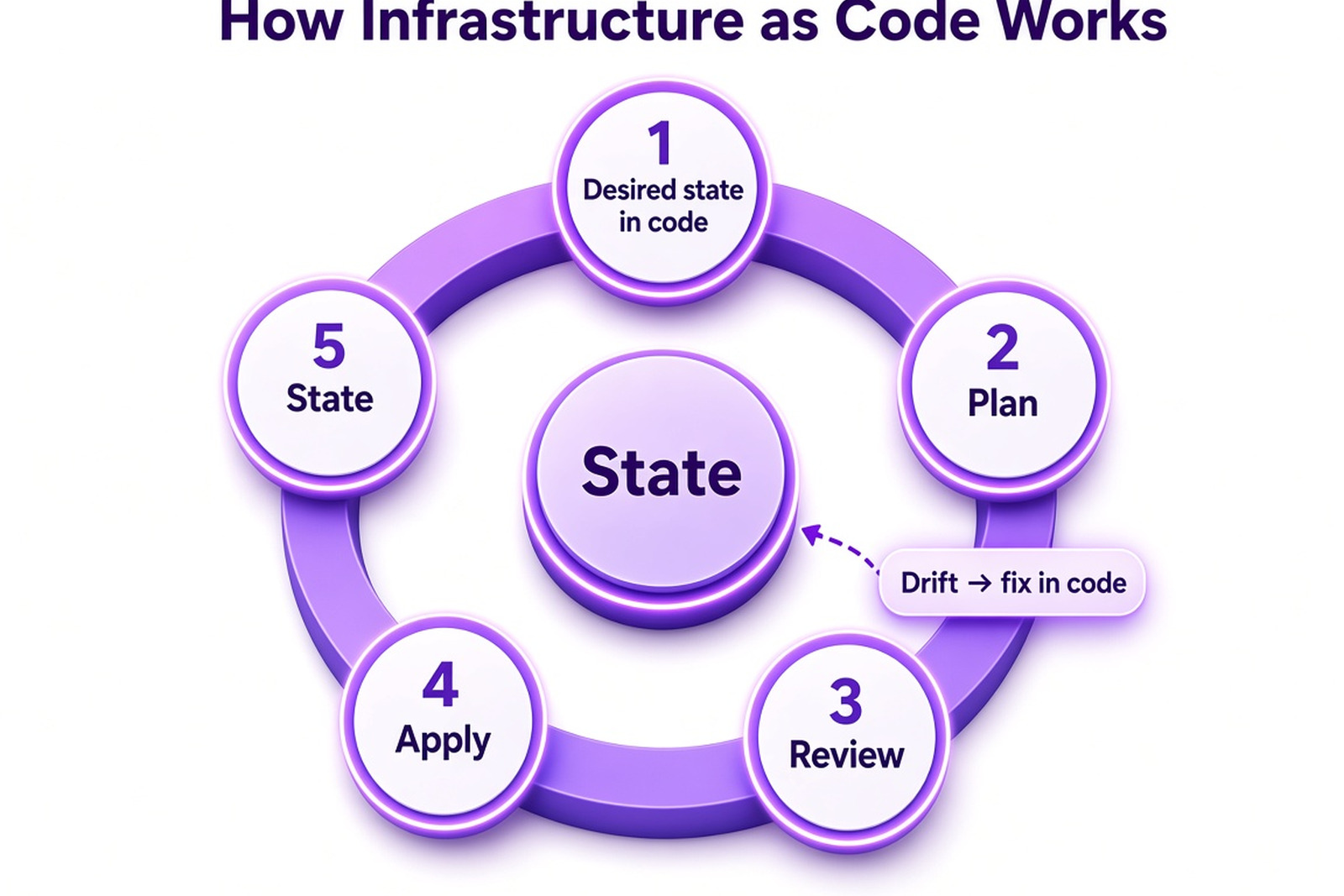
Tools that keep state, such as Terraform and OpenTofu, generally follow the same loop, whatever the language or cloud:
- You describe the infrastructure you want in configuration files.
- The tool reads them and compares the description with what already exists.
- It builds a plan: what will be created, changed, or deleted.
- After you approve the plan, the tool calls the cloud provider's API to make the real infrastructure match.
- It records the result in a state file, so next time it knows what it manages.
The plan step is the most useful part of the workflow, especially in a team. It turns an infrastructure change into something a colleague can read in a pull request, much like a code diff:
Terraform will perform the following actions:

# azurerm_storage_account.storage will be created
+ resource "azurerm_storage_account" "storage" {
+ name                     = "stappdata001"
+ account_tier             = "Standard"
+ account_replication_type = "LRS"
}

# azurerm_virtual_network.main will be updated in-place
~ resource "azurerm_virtual_network" "main" {
~ address_space = [
+ "10.1.0.0/16",
# (1 unchanged element hidden)
]
}

Plan: 1 to add, 1 to change, 0 to destroy.
This is illustrative, shortened output. Two properties make the model dependable.
The first is idempotency. Applying the same configuration again to infrastructure the tool already manages should not cause extra changes if the desired and actual states match, because the tool works out the difference itself. You don't write steps like "create the network unless it already exists." Resources that were created outside the tool aren't picked up automatically, though: they have to be imported first, which the section on adopting IaC covers.
The second is the state record. Because a tool that keeps state knows what it manages, it can notice configuration drift: a change someone made directly in the portal, such as opening a firewall port "just for today." The next plan shows the difference, and you decide whether to bring the code or the environment back in line.
Other tools differ in the mechanics. AWS CloudFormation and Azure Bicep also let you preview changes before they are applied, through change sets and what-if, but the platform keeps track of what has been deployed, so there's no state file for you to manage. Ansible mostly runs tasks on machines and keeps no persistent state at all. The idea stays the same: describe what you want, check what will change, then apply it.
Without that loop, environments turn into snowflakes, each one configured slightly differently by hand and impossible to reproduce reliably.
Declarative vs. Imperative, Mutable vs. Immutable
Tools differ in how you describe infrastructure, and the difference shapes how much work the tool does for you.
| Declarative | Imperative | |
|---|---|---|
| What you write | The end state you want | The steps to get there |
| Typical formats | Configuration files in HCL, YAML, JSON, or Bicep | Scripts, SDK programs, procedural playbooks |
| Running it twice | Typically safe: the tool works out the difference | Safe if the tasks are written to be repeatable; many Ansible modules are |
| Drift | Many tools can detect and report it; it depends on the tool | Usually needs separate checks |
| Best for | Creating and updating cloud resources | One-off tasks and glue between systems |
| Examples | Terraform, Bicep, CloudFormation | Shell scripts, cloud SDK programs, Ansible playbooks written as sequences |
Most IaC tools use declarative configuration files: you state the desired state and let the tool decide how to reach it. Imperative code still has its place when order matters or when you need logic that a declarative format can't express. Some tools blur the line. Pulumi, for example, lets you write declarations in general-purpose programming languages such as Python, Go, or C#, so you get loops and functions while the engine underneath stays declarative.
A second distinction is between mutable and immutable infrastructure. With mutable infrastructure, you change a running server in place: patch it, adjust a setting, restart a service. After a few months every server is slightly different. With immutable infrastructure, you never modify a running resource. To change it, you build a new one from the updated definition, move traffic over, and retire the old one. That takes a little more planning, but it removes a large source of drift and makes rollback easier to reason about, because you can redeploy the previous definition. It doesn't undo changes to data or bring back a deleted stateful resource, so backups and migrations still need attention.
IaC vs. Configuration Management
IaC tools mostly create and change resources: a virtual machine, a network, a database. Configuration management tools such as Ansible, Chef, and Puppet started out configuring software inside machines that already exist: packages, services, files. Chef, for example, describes configuration in a Ruby-based domain-specific language. The border is blurry today. Ansible is often used for both jobs, and many teams now build configuration into images and containers instead of changing running servers, which leaves IaC to handle everything around them.
Benefits of Infrastructure as Code, and What It Costs
The benefits are easiest to understand through the problems they remove.
Environments stop depending on one person's memory. When the definition lives in code, a new engineer can read how production is built, and the knowledge doesn't walk out with a specialist. Any system administrator who has lived through "it only works because Alex set it up" knows what that is worth.
Changes become reviewable. An infrastructure change goes through a pull request like any other code change: a colleague reads the plan, notices the firewall rule that opens too much, and only then does the change get applied. You also get a history of who changed what, when, and why.
Human error shrinks, although it doesn't disappear. Typos and forgotten steps in a manual checklist give way to a definition applied the same way every time. Mistakes still happen, but now they happen in code, where they can be reviewed, tested, and rolled back.
Environments become easier and faster to create. Development, test, and demo environments can be built from the same definition when you need them and removed when you don't. Paying only while resources are in use can bring cloud bills down, especially outside production, but IaC doesn't make infrastructure cheap by itself.
Disaster Recovery and Repeatable Environments
Because the whole environment is described in code, rebuilding it in another region or account after a failure means running the definition, not recalling and redoing hours of manual work. IaC recreates the infrastructure, though, not the data inside it, so you still need backups and a recovery procedure you've actually tested.
What It Costs
None of this is free. There is a learning curve: a new tool, new concepts such as state and plans, and, for teams used to the console, a change of habits. State has to be stored, locked, and protected, and a lost or corrupted state file is a real problem. Speed cuts both ways, since a wrong change can delete resources faster than any person could by clicking. Pipelines and access control take time to set up. The code needs an owner and regular maintenance, because provider and module upgrades don't happen on their own. And the whole approach depends on discipline: if people keep editing resources in the console, drift undermines everything IaC is supposed to give you.
IaC Tools Compared: Terraform, Bicep, Pulumi, and Others
Dozens of automation tools can manage infrastructure as code, but a handful cover most real projects. They fall into three groups: tools tied to one cloud, tools that work across clouds, and configuration management tools.
| Tool | Approach and language | Clouds | State | Licence and status | Worth considering when |
|---|---|---|---|---|---|
| Terraform | Declarative, HCL | Many, through providers | State file, local or remote | Source-available (BUSL) since 2023; HashiCorp is now part of IBM | You need several clouds and the largest pool of modules and providers |
| OpenTofu | Declarative, HCL (a Terraform fork) | Many, through providers | State file, local or remote | Open source, under the Linux Foundation | You want Terraform's model with an open-source licence |
| Pulumi | Declarative engine; code in Python, Go, C#, TypeScript, Java, or YAML | Many | Managed service or self-hosted backend | Open-source engine, commercial service | Developers will write the infrastructure and want real languages and unit tests |
| Azure Bicep and ARM templates | Declarative; Bicep is a language that compiles to ARM's JSON | Azure only | Tracked by Azure, no state file to manage | Native to Azure | You run on Azure and want the shortest path |
| AWS CloudFormation and CDK | CloudFormation: YAML or JSON; CDK: code in programming languages that generates templates | AWS only | Tracked by AWS | Native to AWS | You run on AWS and want deep integration |
| Ansible | Mostly procedural YAML playbooks, agentless | Any, through modules | No persistent state | Open source, from Red Hat | You configure software on servers, plus simple provisioning |
| Google Infrastructure Manager | Terraform configurations run as a managed service | Google Cloud | State kept in Cloud Storage | Native to Google Cloud; replaces Deployment Manager | You are on Google Cloud and want managed Terraform |
The native tools, Bicep and ARM, CloudFormation and CDK, and Infrastructure Manager, give the deepest integration with their cloud and usually support new services quickly, but they tie your definitions to one provider. Terraform, OpenTofu, and Pulumi work across several clouds, which matters once a company runs workloads in more than one place or wants to avoid dependence on a single provider. The configuration management tools sit a layer below, configuring what runs on the machines. Chef and Puppet are the older members of that group and are still used in many organizations.
Azure Resource Manager and Bicep
On Azure, the native route runs through Azure Resource Manager (ARM). ARM templates are JSON files that describe Azure resources, and Bicep is a more readable language that compiles to them. Both are declarative, and Azure itself tracks what has been deployed, so there's no state file to look after. The trade-off is that they only work with Azure.
Google Cloud: From Deployment Manager to Infrastructure Manager
Google Cloud's older native tool, Deployment Manager, has not been supported since April 2026, and Google plans to turn the service down on June 30, 2027. Google points users to Infrastructure Manager, which runs Terraform configurations as a managed service. It's a useful reminder when you choose a tool: native tooling can be retired, so ask what happens to your definitions if it is.
How to Choose an IaC Tool for Your Team
There's no best IaC tool, only the one that fits your clouds, your people, and your appetite for risk. A few questions settle most of it:
- How many clouds do you use now, and how likely are you to add another?
- Which languages does the team already write and enjoy?
- Who will own the code: operations engineers, developers, or both?
- How much do you rely on ready-made modules and providers?
- How will state be stored, locked, and shared?
- How do you feel about licensing and the direction of the vendor behind the tool?
- Which testing and policy checks do you need?
Some patterns come up often. A team that builds on one cloud and wants the shortest path usually does well with that cloud's native tool, which on Azure means Bicep. A team with several clouds, or one that wants the biggest pool of modules and candidates who already know the tool, usually looks at Terraform or OpenTofu. Developers who would rather write C# or Python than learn a new configuration language may prefer Pulumi. And if the job is mostly configuring software on existing servers, Ansible fits. These are patterns, not rules, and mixing tools is common: Terraform for the cloud resources, Ansible for what runs on the machines.
Azure Infrastructure in Bicep and Terraform
Here is the same small piece of Azure infrastructure, a storage account with a few security settings, in both tools. First in Bicep:
param location string = resourceGroup().location

param storageName string

resource storage 'Microsoft.Storage/storageAccounts@2023-05-01' = {
  name: storageName
  location: location
  kind: 'StorageV2'
  sku: {
    name: 'Standard_LRS'
  }
  properties: {
    supportsHttpsTrafficOnly: true
    minimumTlsVersion: 'TLS1_2'
    allowBlobPublicAccess: false
  }
}
And in Terraform:
resource "azurerm_storage_account" "storage" {
  name                     = var.storage_name
  resource_group_name      = azurerm_resource_group.main.name
  location                 = azurerm_resource_group.main.location
  account_kind             = "StorageV2"
  account_tier             = "Standard"
  account_replication_type = "LRS"
  https_traffic_only_enabled      = true
  min_tls_version                 = "TLS1_2"
  allow_nested_items_to_be_public = false
}
Both set the same three security settings: HTTPS only, TLS 1.2 or newer, and no public access to blobs. That's a small part of a secure storage account, not the whole of it. The Bicep version is shorter for Azure alone, and Azure keeps track of the deployment for you. The Terraform version needs a provider and a state backend, but gives you the same workflow on other clouds. Treat both as illustrations, not production configuration. Names, networking, encryption, and attribute names that change between provider and API versions all need decisions that depend on your system.
If your application is built on .NET and runs on Azure, infrastructure code can live in the same repository and go through the same pipeline as the application. Our Azure engineering team works in this kind of setup.
Implementing Infrastructure as Code on Existing Infrastructure
Starting from a blank page is the easy case. Most teams start from a running environment that was built by hand, with a wiki page here and a script nobody dares to touch there. You can't pause the business while you rewrite it, so the move has to happen in stages.
1. Take an Inventory
List what exists: resources in the console, scripts, runbooks, and the people who know about each of them. Mark what's critical, what's disposable, and what nobody can explain. The last group deserves attention first, because those are the resources most likely to surprise you later.
2. Start Small
Pick something low-risk: a new service, a development environment, or a self-contained part of a non-production system. A small success builds confidence, and a small failure is cheap. Avoid starting with the production database.
3. Lay the Foundation
Before the code grows, set up the basics: a repository, a place for state with locking if your tool uses it, an identity for the pipeline with only the permissions it needs, and a pipeline that shows the plan on every pull request. It's much harder to add these once ten people are already working in the code.
4. Import Instead of Recreating
For resources that already exist, use the tool's import features to bring them under management instead of deleting and rebuilding them. Define the configuration, import the resource with your tool's mechanism (in Terraform and OpenTofu, an import block next to the resource definition), then run a plan and check that it contains no unexpected changes. Until the plan is clean, the code does not yet describe reality, and you shouldn't trust it with a production apply. Even a clean plan only shows that code and resource agree. It doesn't tell you whether the next change is safe, so dependencies, data, and stateful resources still need a human look.
5. Close the Side Door
Once a resource is under IaC, gradually remove write access to it in the console, and set up a scheduled plan that reports drift. Emergencies will still happen, so keep an emergency path, but make it a rule that any manual fix gets written back into code afterward.
6. Expand
Move service by service or environment by environment, each with a clear definition of done: for instance, a clean plan and no manual changes for a month.
Expect a hybrid period of weeks or months in which part of the system is code and part is still console. That's normal. Import is tedious, and the first definitions will feel like work that produces nothing visible. The payoff comes later, when the first new environment takes an afternoon instead of three weeks. If the underlying systems are old as well, moving to code often goes together with modernizing legacy infrastructure.
Need a hand moving existing infrastructure to code? Our DevOps engineers can assess your setup and plan the move. Talk to our team
Need a hand moving existing infrastructure to code?
Our DevOps engineers can assess your setup and plan the move.
Infrastructure as Code Best Practices
Once you're past the first few resources, how you organize the code starts to matter more than which tool you picked. These infrastructure as code best practices are about keeping a growing codebase understandable.
Repository Layout
One repository for all infrastructure is a sensible start: it's easy to search, and changes that touch several parts can go in a single pull request. Split it later, when different teams need different access or release rhythms. A common layout looks like this:
infrastructure/
├── main.tf
├── variables.tf
├── outputs.tf
├── versions.tf            # pinned Terraform and provider versions
├── environments/
│   ├── dev.tfvars
│   ├── staging.tfvars
│   └── production.tfvars
├── modules/
│   ├── network/
│   ├── app-service/
│   └── database/
└── README.md
It's one layout among several, and the same idea applies to Bicep and other tools: shared modules, one place for the entry point, and a separate file of values per environment. Two practical details are easy to miss. Terraform loads only terraform.tfvars and *.auto.tfvars files from the working directory, so the files in environments/ have to be passed explicitly, for example with -var-file=environments/dev.tfvars. And a separate values file changes only the inputs, not the state: give each environment its own state, for example a separate backend key, so that applying to dev can't touch production.
Modules and Environments
Group related resources into modules with clear inputs and outputs, so teams reuse the same vetted network or database definition instead of copying it. Keep modules small and version them. For environments, use the same code with different variables and a separate state for each. Copying a folder per environment feels quick, but the copies drift apart within months, and then you're back to snowflakes, only now they're in Git.
State and Versions
Keep state in a remote backend with locking, encrypted and with limited access, and never edit it by hand. State can contain sensitive values, so treat it like a secret. Pin the versions of providers and modules, so that an upgrade released on Tuesday doesn't change Wednesday's plan without anyone deciding it should.
Naming, Tags, and Review
Pick a naming convention and a minimal set of tags, such as owner, environment, and cost center, on day one. It saves hours when you're reading a cloud bill or tracing an incident. Keep changes small: a pull request that touches three resources is reviewed properly, while one that touches three hundred is approved with a sigh. Give each module a short README with its inputs, outputs, and a usage example, and keep secrets out of the code altogether, which the next section covers.
Testing and Securing Infrastructure Code
Infrastructure code deserves at least the same checks as application code, and arguably stricter ones, since one wrong line can delete a database or expose it to the internet. Start with cheap checks and work up:
- Formatting and validation on every commit, which catches syntax errors and obvious mistakes in seconds.
- Static analysis for misconfiguration, which looks for open storage, public ports, disabled encryption, and missing logging before anything is deployed. Open-source scanners exist for most tools, such as Checkov and Trivy.
- Policy as code: rules written once and enforced automatically, for example "storage must never be public" or "every resource carries an owner tag". A non-compliant change fails the pipeline no matter who wrote it. Open Policy Agent is a common engine for this.
- Plan review by a person, who reads the plan and looks hardest at deletions and replacements.
- Integration tests in a temporary environment for important modules: create the resources, check them, destroy them. Terratest is one example for Terraform.
- Drift detection in production, using a scheduled plan that reports differences.
Cloud Security: Secrets, Misconfigurations, and Access
The most common problem in infrastructure code is a misconfiguration, and its nature is that it gets copied. One careless line in a shared module is deployed to every environment that uses it. The upside is the same: fix it once and it's fixed everywhere.
Secrets are the second classic mistake. Passwords, keys, and tokens don't belong in templates, variable files, or the repository, even in a private one. Reference them from a secrets manager instead, and remember that state files can contain sensitive values, so protect them accordingly. If a secret was ever committed, treat it as compromised and rotate it.
Access comes next. Give the pipeline identity only the permissions it needs, use separate identities for separate environments, and limit who can approve a production apply. Strict access control around the pipeline matters more than around any individual engineer, because the pipeline is what can change everything.
Finally, the code you depend on is a risk too: providers, modules, and pipeline actions come from outside. Pin versions, use trusted sources, and review updates before accepting them. OWASP's 2025 Top 10 lists Software Supply Chain Failures as a category of its own for a reason.
Security testing and policies as code belong in the same pipeline that applies the changes, so they run every time and nobody has to remember them. For the application side of the picture, see our guide to security best practices for web applications.
IaC, CI/CD, and AI Assistants
Infrastructure code works best when it follows the same path as application code through the software development life cycle. Continuous integration runs the checks, a person reviews the plan, and the change is applied by the pipeline, not by someone's laptop. That keeps application deployment and the infrastructure under it in step. A typical pipeline looks like this:
- Someone opens a pull request with the infrastructure change.
- The pipeline formats and validates the code and runs the security scans and policy checks.
- The plan is posted as a comment on the pull request.
- A reviewer reads the plan and approves or asks questions.
- After the merge, the pipeline applies the change to the lower environments.
- Production is applied only after a manual approval.
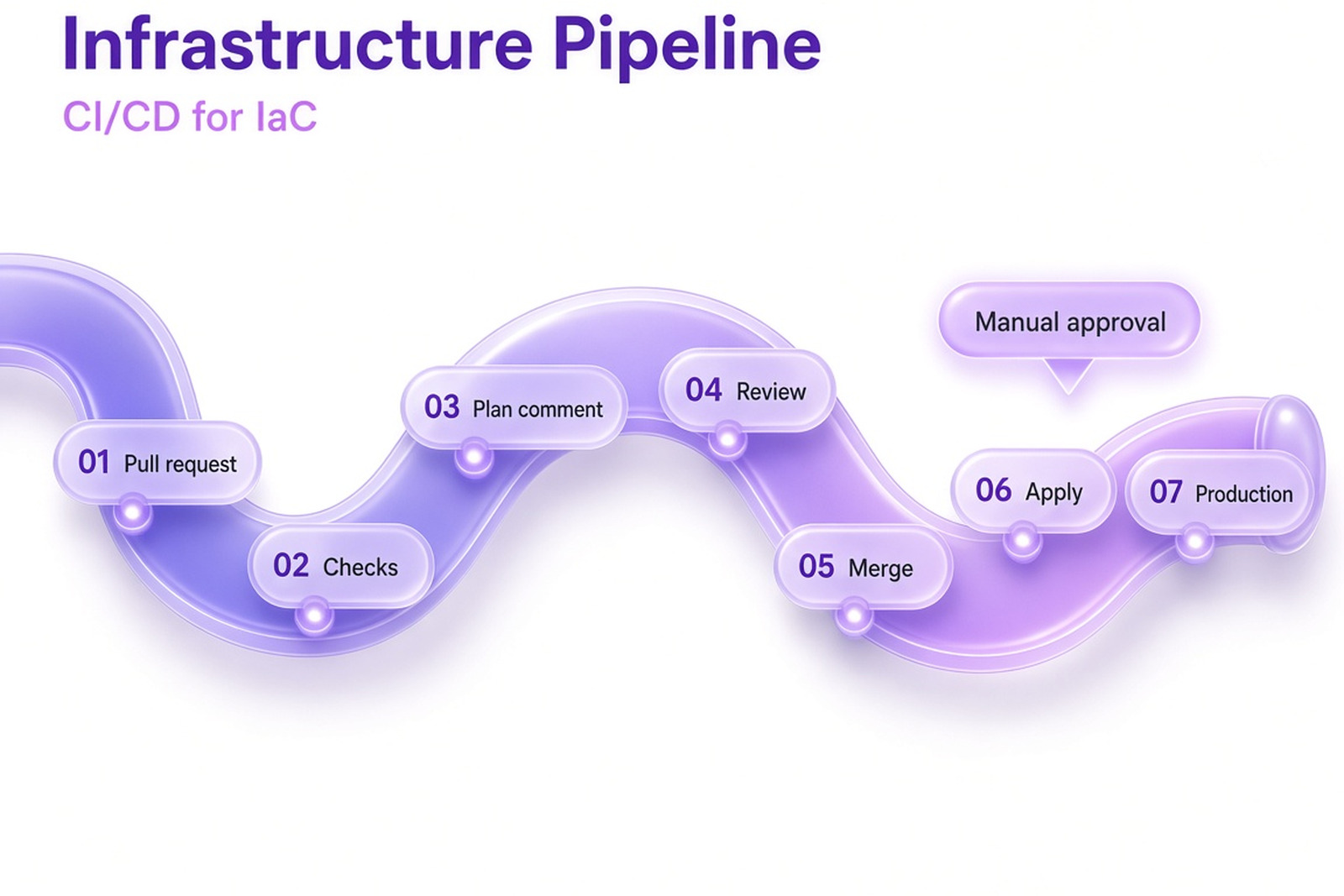
Applying only from the pipeline matters more than it looks. It leaves an audit trail, it means everyone runs the same tool versions, and it ensures production can't be changed by a command typed into the wrong terminal. If CI/CD is new to you, our overview of how CI/CD works covers the basics.
AI Assistants and Infrastructure Code
AI assistants can draft Bicep or Terraform quickly, and they're good at boilerplate: a network, a storage account, a pipeline file. They also go wrong in ways that are easy to miss. They invent properties that don't exist in the provider version you use, produce outdated syntax, or choose defaults that leave something open. Treat the output as a draft from a new colleague. It goes through the same checks as everything else, and a person reads the plan. Nobody, human or assistant, should apply changes to production without review.
Common Mistakes and When IaC Isn't Worth It
Some mistakes show up only after the first months, once the novelty has worn off.
"Just this once" in the console is the most common. A quick manual fix during an incident is understandable. A manual fix that never makes it back into code is how drift starts, and a few of those later nobody trusts the plan anymore. Agree on an emergency path and on the rule that every manual change gets written back.
One giant state for everything is another. It starts as convenience, and then every plan takes ten minutes, a single mistake can touch unrelated resources, and everyone waits for the same lock. Split state by service or by how often things change, so that a change to one application can't reach the network that other teams depend on.
Skipping plan review for "small changes" is a quieter one. Small changes are exactly where a replacement hides: renaming a resource can mean destroying and recreating it, and the plan is the only place you'll see that before it happens.
Then there's building too much abstraction too early. A generic module framework designed before you have three real use cases usually ends up fitting none of them. Copy once, copy twice, and generalize the third time, when you can see what actually varies.
Finally, treating the first version as final. Infrastructure code needs refactoring and upgrades like any other code, and if nobody owns it, it quietly rots until the day someone has to change it urgently.
It's also fair to say that IaC isn't always worth it. A throwaway prototype, a single small server that will never change, or a team without the capacity to maintain the code can reasonably stay with manual setup for now. Even then, a short script and a README that explain how it was built are better than nothing, and they make a later move to code much easier.
The Bottom Line
Infrastructure as code is less about a tool than about a habit: infrastructure changes only through code that someone has reviewed. Your choice of tool follows from your clouds, your team, and your appetite for risk, and it matters less than the discipline around it. Start small, import before you rebuild, keep the console for emergencies, and put the checks in the pipeline so they run without anyone having to remember them.
If you'd like to talk through your own setup, get in touch and our DevOps engineers will take a look.