
Enterprise Digital Transformation: What It Is, How It Works, and How to Start
Many large companies still run daily work on legacy systems built ten or fifteen years ago. Every new request turns into another workaround: a spreadsheet here, a manual re-entry there. Meanwhile customer expectations keep moving. At some point, keeping everything as it is costs more than changing it.
But changing a company at that scale is expensive and risky, and many programs never reach their goals. That is why enterprise digital transformation works better as a series of smaller decisions than as one big bet. You change a little, look at what you learned, and decide whether to go further.
This guide shows how that looks in practice: what enterprise digital transformation is and how it differs from buying new software, what it consists of, how to plan it step by step, how to choose an approach for old systems, who is responsible for what, how to measure progress, and why these programs stall. One made-up example runs through the article to keep the ideas concrete.
What Is Enterprise Digital Transformation?
Enterprise digital transformation is the process of changing how a large company works by applying digital technology to its business processes, products, and the daily work of its people. The goal is a business result, such as faster order handling or a lower cost of running systems, not a list of new tools.
That last point matters. A company can replace its order system, but if sales, the warehouse, and finance still follow the old steps, very little improves. The change has to cover the system, the process around it, and the people who use it. People use the phrase for everything from moving to the cloud to reinventing a business model, so it is worth saying that this article uses it in the broader sense described here.
Our running example.
To keep things concrete, we follow one illustrative company. It is invented, and so is every detail. It is a mid-sized distributor of industrial components with three warehouses. Orders go into a system that is more than fifteen years old and runs on the company's own servers. Customer service tracks order status in spreadsheets. The same order is typed by hand into two or three systems: order management, warehouse, and finance. And the vendor is about to stop supporting the database under the order system.
Digital Transformation vs Digitization and Digitalization
These three terms are used loosely, and sources draw the lines differently. Gartner's glossary defines digitization as converting something from analog to digital form, and digitalization as using digital technologies to change a business model. Many other writers use "digitalization" for something smaller: running an existing process better with digital tools. We use the smaller meaning here because it makes the steps easy to tell apart.
| Term | What it means here | Example from the running example |
|---|---|---|
| Digitization | Converting information from analog to digital form | Scanning paper order forms into files |
| Digitalization | Using digital tools to run an existing process better | Letting customers submit orders through a web form instead of by phone |
| Digital transformation | Rethinking how the whole business operates so that people, systems, and data work differently | Rebuilding the path from order to delivery so that customers, warehouses, and finance work from one order record, and customers can see status without calling |
Digital Transformation at Enterprise Scale: What Changes
Size changes the job. A small company can often switch its systems over a weekend. An enterprise has dozens of systems, several teams that own them, and approvals at every level. A change in one place breaks something in another, and nobody has the full picture. That is why enterprise programs need clear owners, an inventory of what exists, and a way to decide what comes first.
Why Companies Do It, and When It Is Not Worth It
Companies start digital transformation for practical reasons, and most of them come down to a few pressures:
- Customer expectations. Customers who can track a parcel from their phone expect the same from a supplier. In our example, buyers phone customer service because they cannot see where their order is.
- The rising cost of old systems. Maintenance gets more expensive as systems age, and vendors stop supporting components. When the database under the order system loses support, running it becomes a risk, not just a cost.
- Scattered data. When the same customer exists in three systems under three spellings, simple questions get unreliable answers.
- Regulation. New reporting or privacy rules can be hard to meet on systems that were never designed for them.
- Competition. Rivals that process orders faster or offer new digital services set the pace, and market shifts in the industry follow them.
- Preparing for analytics and AI. Models need consistent data, and old systems rarely provide it.
Customer Experience and Changing Customer Expectations
Customer experience is often where the case for change becomes visible to executives. Buyers compare every supplier with the best digital service they use anywhere, not only with competitors in the same industry. A customer who gets a status update without calling will expect it from everyone. Meeting those changing customer expectations usually means fixing what sits behind the screen: orders entered once, data kept in one place, statuses that update on their own. Better data about customer needs can also help a company tailor its service, which may strengthen customer loyalty, although no tool delivers that by itself.
When it is not worth it yet
Transformation is not always the right answer. It is usually better to wait, or to start smaller, when:
- nobody owns the result;
- there is no specific problem, only a wish to "update everything";
- the current system works and is not causing damage;
- the company lacks the capacity to finish what it starts;
- people are not willing to change how they work.
In those cases a smaller fix, or a delay, is the honest recommendation.
Digital Transformation Framework: Four Key Components
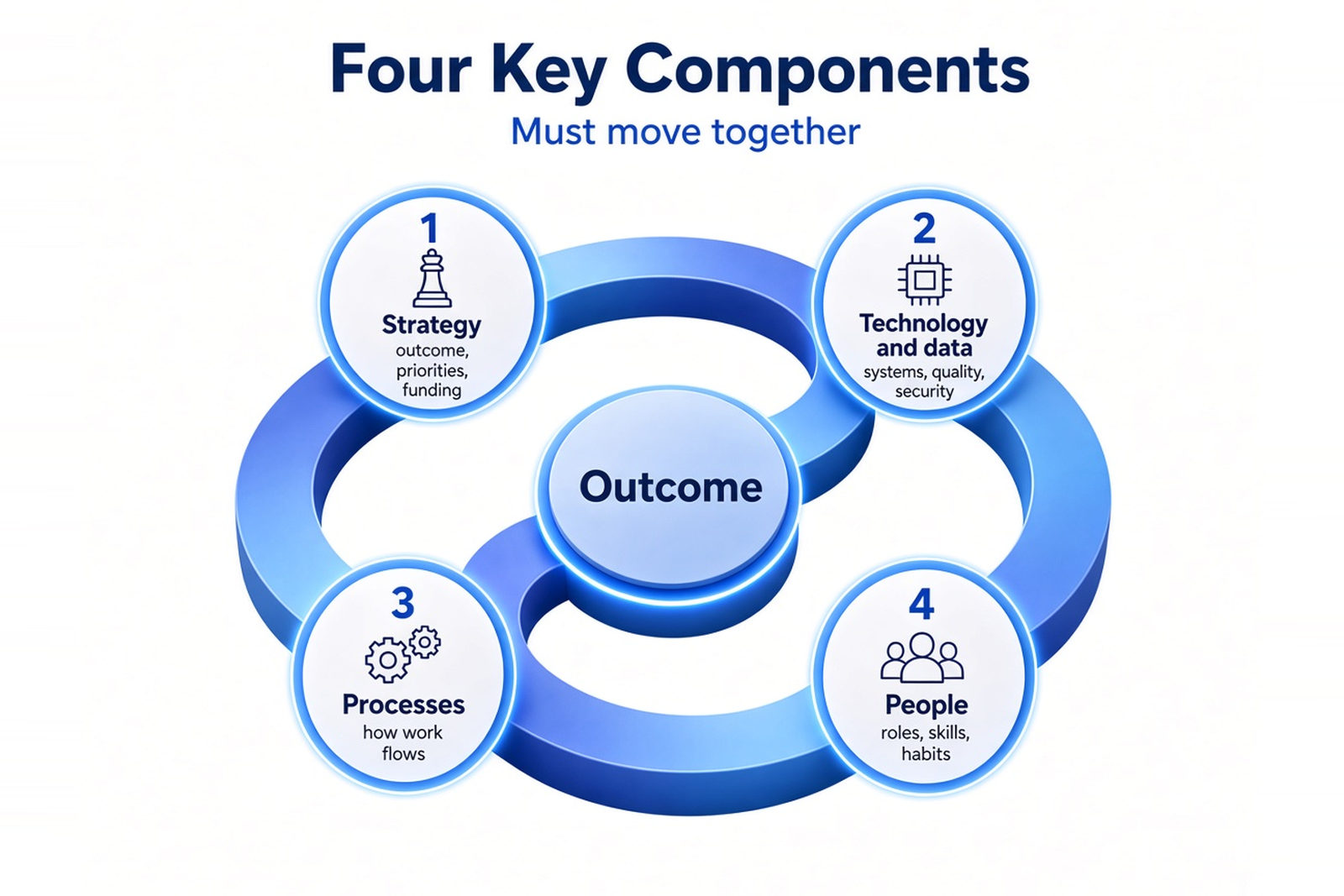
Published frameworks use different labels, but most describe the same four parts: strategy, technology and data, processes, and people. Think of them as four things that have to move together. If one lags behind, the others stall.
| Component | What it covers | Typical mistake | Early warning sign |
|---|---|---|---|
| Strategy | The outcome, priorities, funding, and who owns the result | Buying a platform with no outcome attached to it | Leaders describe the goal in different ways |
| Technology and data | Systems, integrations, data quality, security | Leaving data cleanup for later | Pilot results disagree between systems |
| Processes | How work flows across teams | Digitizing a broken process as it is | The new system exists, but people still use spreadsheets |
| People | Roles, skills, habits, incentives | Training once, at launch | Support requests spike and workarounds appear |
A digital transformation strategy does not need to be long. It needs an outcome, an owner, priorities, and a way to fund the work, all tied to the wider business strategy. In our example the strategy fits in one sentence: customers see order status without calling, and each order is entered once.
The technology part is the old order system and the duplicate customer records. The process part is removing the re-typing and the outdated processes around it. The people part is the hardest to see on a diagram: account managers who answer customers from spreadsheets, and warehouse staff who are used to entering orders twice, will have to work differently. For them it is also a question of employee experience, because a new system that makes the day harder will be worked around.
Digital Technology and Data
Digital technology here means the practical set: cloud services, integrations between systems, analytics, and automation. None of them is the goal. Pick them when they solve a specific problem and skip them when they do not.
Data deserves more attention than tools. Name an owner for each important data set, such as customers, products, and orders. Agree on what "correct" means for each, and decide who can see what. This is the core of data governance: clear ownership, quality rules, and privacy and access controls that help keep data usable. Security is easiest to build in at the start, when you decide who can access which system, how partners connect, and where data lives. Adding it at the end usually means redoing parts of the design.
Digital Transformation Roadmap: Step by Step
A digital transformation roadmap is a sequence of steps with a decision at the end of each one. You start with the outcome and a baseline, take stock of what you have, set priorities, choose an approach for each system, test it in a pilot, roll it out in waves, and keep measuring.
A large program may have no single finish line, but every initiative inside it should have a goal, a date, and a point where someone decides whether to continue. The steps below apply to each initiative. The order is common, not the only one: other sources split the work into fewer or more steps.
| Step | What the team does | Output | Decision question at the end |
|---|---|---|---|
| 1. Define the problem and outcome | Names the owner, writes the goal, measures today's level (the baseline) | A one-page outcome statement with a baseline | Is the problem worth solving now, with a named owner behind it? |
| 2. Assess current capabilities | Inventories systems, data, integrations, processes, and skills | A map of what exists, known risks, end-of-support dates | Do we understand the starting point well enough to plan? |
| 3. Set priorities and sequence | Ranks work by value, risk, and dependencies | An ordered list of initiatives | Which initiative goes first, and what do we fund now? |
| 4. Choose an approach per system | Decides to keep, move, rebuild, replace, or retire each system | A decision for every system | Are the trade-offs understood and accepted? |
| 5. Run a pilot | Tests in one location against success criteria set in advance | Pilot results compared with the baseline | Did the pilot meet the criteria? |
| 6. Scale in waves | Rolls out in stages, trains people, supports them | A wave plan and a support model | Is the next wave ready, or does something need fixing first? |
| 7. Measure, review, adjust | Tracks metrics and updates priorities | A regular review | Continue, adjust, pause, or stop? |
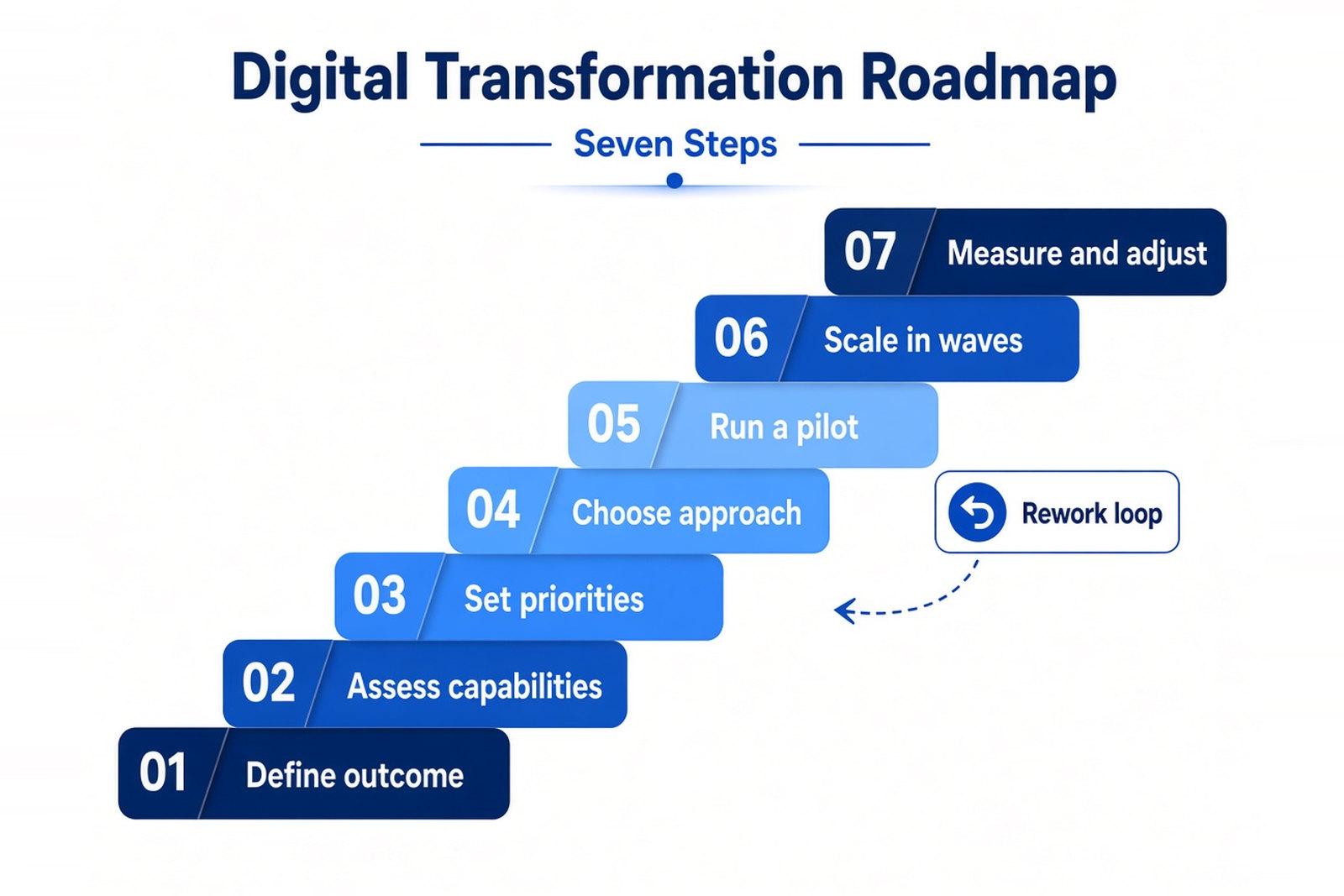
In the diagram the pilot sends the work back for rework. That is exactly what happens to our example company later in this article.
Assess Current Capabilities Before Choosing Tools
Teams often choose technology first and discover the problems later. Do the inventory first. List the systems and who owns each one, what data each holds, how they connect, when vendor support ends, and who actually knows how each one works. Include skills too: will anyone be able to run the new setup?
In our example the inventory finds four systems that matter (order management, warehouse management, finance, and the customer spreadsheets), an old reporting tool that few people use, and the date when database support for the order system ends. It also finds the same customers recorded several times under different spellings, which will matter later. If you want an outside view at this stage, digital transformation consulting often begins with this kind of assessment and planning.
Decision Making at Each Checkpoint
Between steps there is a checkpoint. The team shows what it learned, and the people who control the budget and staff decide what happens next. There are four possible decisions: go on, rework, pause, or stop. Rework means the evidence is not good enough yet, so the team goes back to fix a specific gap. Pause means the idea is sound but the timing or capacity is wrong. Stop means the evidence says the money and people should go elsewhere.
This is the logic of the Stage-Gate process, which companies have used for years to manage product development. Applying it to transformation initiatives is our suggestion, not part of a standard transformation framework. What matters is that each decision is made on evidence, recorded in writing, and comes with the budget for the next step. In our example the pilot hits a data problem, and the checkpoint sends it back for rework instead of rolling it out.
Planning an enterprise digital transformation around legacy systems?
Talk through inventory, modernization options, and a phased roadmap with our team.
Modernizing Legacy Systems: Options and Trade-offs
Modernizing legacy systems does not mean replacing everything. A legacy system is an older system that is still in use, often because it runs something the business depends on. Age alone is not the problem. It becomes one when the vendor no longer supports a component, when the system is hard to connect to others, or when few people understand it. For each system you choose one of several approaches, and the right one differs from system to system.
Most legacy systems carry technical debt, the accumulated cost of old shortcuts and outdated choices. Like financial debt, it charges interest: every change takes longer and breaks more than it should.
A widely used way to sort the options is the "7 Rs" in AWS Prescriptive Guidance: retire, retain, rehost, relocate, repurchase, replatform, and refactor or re-architect. It was written for cloud migration, but the logic helps with any modernization decision. Relocate, which moves virtualized workloads between environments, is a specialist case, so the table covers the other six.
| Option | What changes | When it fits | Main risk |
|---|---|---|---|
| Retire | The system is switched off | Nobody needs it any more | Hidden users or reports depend on it |
| Retain | Nothing for now | Compliance, performance, or risk reasons, with a plan to revisit | Cost and risk keep building |
| Rehost (lift and shift) | The system moves to new infrastructure with no changes | You need a fast move and the code itself is fine | Technical debt moves along unchanged |
| Replatform | Small changes so the system can use managed services | A component, such as a database, is nearing the end of support | Needs extra skills and testing |
| Repurchase | You replace the system with a ready-made product or SaaS | A packaged product covers the need | Processes and data have to be adapted |
| Refactor or re-architect | The architecture is changed to suit the new environment | The system limits the business and deserves long-term investment | The most complex, costly, and risky option |
AWS notes that replatforming suits applications whose components or databases are near the end of support, which is the situation of our order system, and that refactoring is the most complex strategy and a poor fit for moving many applications at once. Cloud computing can help in several of these options, but it is a destination, not a strategy: moving a system to the cloud without fixing it moves its problems too. Cloud migration is a topic of its own.
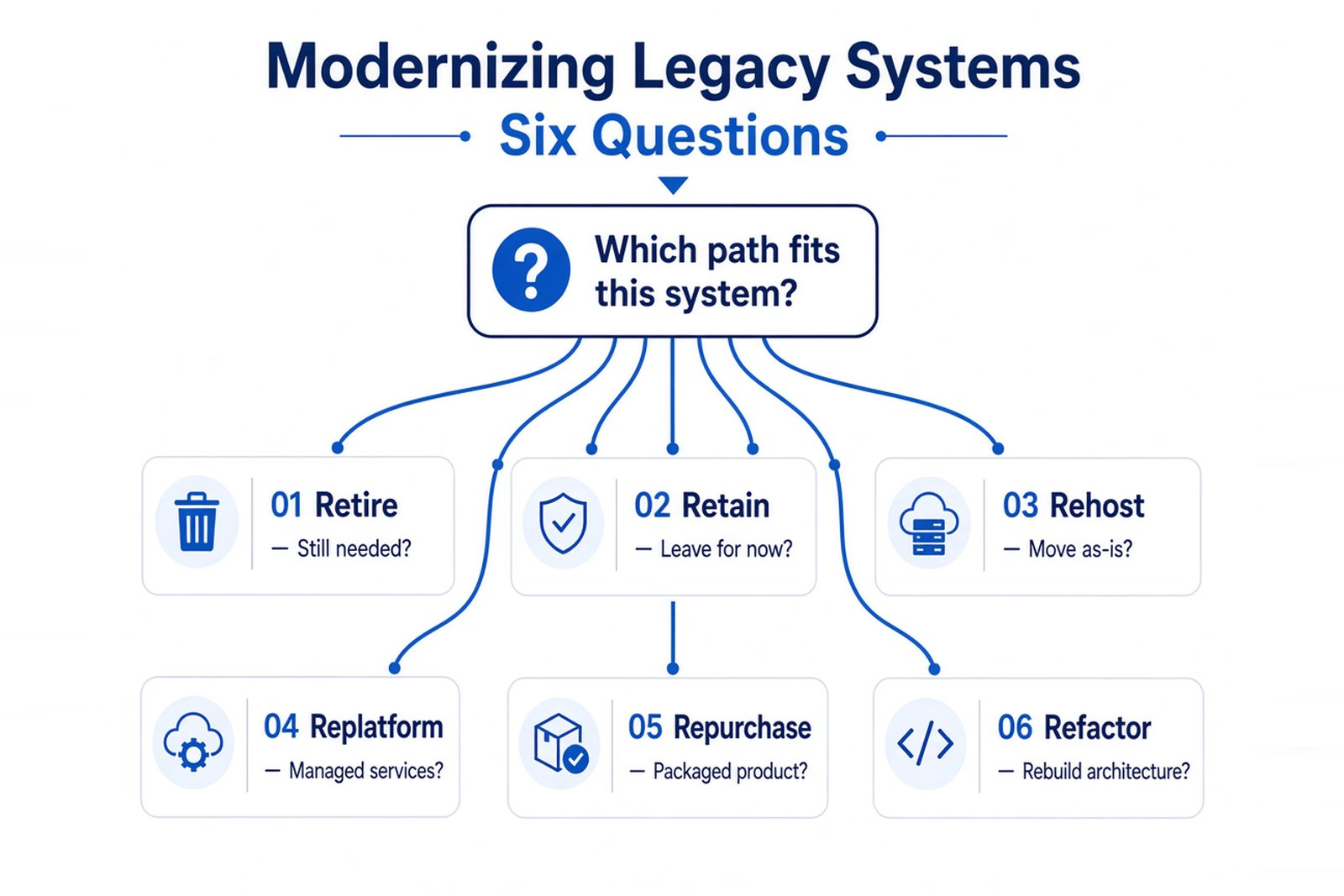
The diagram turns the table into questions you can ask about each system.
Terms you will meet.
Data migration is moving data from the old system to the new one, usually cleaning it on the way. A parallel run means the old and new systems work side by side for a while so you can compare results. A rollback plan describes how to return to the old system if the new one fails. Cutover is the moment work switches over. What breaks most often is rarely the code. It is data quality, the connections between systems, and dependencies nobody wrote down.
Order matters. Changing everything at once is rarely wise. In our example the company picks a different path for each system. The order system is replatformed: its database moves to a supported platform with limited code changes, because support is ending and a full rebuild would take far longer. Refactoring can come later, module by module. The warehouse system stays for now and is connected through an integration. The customer spreadsheets are replaced by a ready-made CRM service, and the old reporting tool is switched off. The result is easy to describe: the order system is the one place where an order lives. The warehouse system, finance, and the CRM service connect to it, so a status change made in the warehouse reaches customer service and the customer without anyone retyping it.
For more on strategies and process, see What Is Application Modernization?, and for tools by use case, Application Modernization Tools by Use Case. If you want a second opinion on which option fits, a legacy application modernization team can review the systems with you.
Roles, Governance, and Teams
Someone has to own the result, someone has to decide, and someone has to do the work. When those three get mixed up, programs drift. Job titles differ from company to company, so treat the table below as a map of responsibilities, not a standard org chart.
| Role | Main responsibility | Typical decision |
|---|---|---|
| Executive sponsor | Backs the program, removes obstacles, secures funding | Whether to fund the next stage |
| Business owner of the outcome | Owns the result and the baseline | What counts as success |
| CIO or CTO (some companies also have a chief digital officer) | Technology direction and delivery capacity | Which technology approach to take |
| Program or project manager, and the PMO | Plans, tracks, reports, and coordinates teams | Sequencing and dependencies |
| Enterprise or solution architect | Keeps the big picture of systems and integrations | How systems should connect |
| Product owner | Speaks for users and sets priorities | What gets built first |
| Change and training lead | Prepares people for the new way of working | How to support each role |
| Delivery team | Builds, tests, and migrates | How to implement |
Governance is simply who decides what, and when. Set regular checkpoints (see the roadmap above), name who sits on them, and agree how disputes about priorities get settled. A small group is usually easier to work with, as long as every function the project depends on is represented. Business operations, IT, finance, and security all have a stake, and a decision made without one of them tends to come back later.
Who does the work
There are four common ways to staff delivery. None is better in general. The right one depends on how long the work lasts and how well you can define it.
| Model | When it fits | Main advantage | Main risk |
|---|---|---|---|
| In-house team | Core systems the company will run for years, with strong internal skills | Deep knowledge of the business and full control | Hiring is slow and capacity is limited |
| Dedicated team from a partner | Long-running work with changing requirements | A stable team focused on your product that can grow or shrink | Needs good onboarding and clear ownership on your side |
| Staff augmentation | Short-term gaps in specific skills | Quick access to expertise while your own team stays in charge | Management load stays with you, and knowledge can leave with the person |
| Project outsourcing | Well-defined work with clear deliverables | The partner takes responsibility for delivery | Less flexibility if requirements change, and the scope has to be clear |
For a closer look at the second option, read What Is a Dedicated Development Team Model?. For the third, see What Is Resource Augmentation?.
When you choose a partner, check four things: how knowledge is handed over, who owns the code and the data, how you can scale the team or leave, and how progress is reported.
Change Management and Cultural Transformation
Change management is the work of preparing people for a new way of working. It means finding out how the change affects each role, explaining why it is happening, training people before launch, supporting them afterwards, and reinforcing the new habits. Cultural transformation is the slower part of the same job: habits and decision rights shift, and that takes longer than a software rollout.
In our example, account managers answer customers from spreadsheets and know exactly where everything is. Warehouse staff are used to typing each order twice. The new setup takes away both habits. If nobody explains why, people keep the spreadsheets "just in case," and the old process quietly lives on next to the new one.
What helps in practice:
- Map the impact on each role before launch, not after.
- Plan communication around the question people actually ask: what changes for me?
- Train on a test environment, so mistakes cost nothing.
- Pick super users from the pilot group and let them help their colleagues.
- Give fast help in the first weeks after go-live.
- Collect feedback and track how much the new system is really used.
These steps also shape employee experience and employee engagement. People who can do their job in the new system without fighting it are less likely to work around it. Skills need continuing attention too: continuous learning, not a single training day. McKinsey's 2018 survey on digital transformations found that companies with successful transformations tend to take a better-funded, more systematic approach to talent than the rest.
Leaders set the tone. When a sponsor explains the reason for the change in plain words and shows up at the checkpoints, people take it seriously. Models such as ADKAR describe the stages an individual goes through, from awareness to reinforcement. Use one if it helps, but the practices above matter more than the label on them.
Budget, Timeline, and ROI: What to Expect
There is no honest standard price or duration for digital transformation. Cost and timing depend on a handful of factors, and you can estimate most of them once the inventory is done:
- the scope: how many systems and teams are involved;
- the complexity of legacy systems and their integrations;
- the quality of the data;
- regulatory requirements;
- the team model you choose;
- training and support after launch;
- the period when the old and new systems run side by side.
Fund the first phase, with a checkpoint at its end, and decide on the next phase afterwards. That limits what you can lose on a wrong assumption and keeps the budget tied to evidence.
Be careful with round-number timelines in articles and vendor brochures. Unless a source explains how they were measured, treat them as guesses. A better estimate comes from your own pilot: how long it took to move one location, and what slowed it down.
Return on investment looks different from one initiative to the next. Some initiatives have a clear, measurable return, like removing double entry. Others create shared capabilities, such as cleaner data or better infrastructure, whose benefits show up across several later projects, so they are easier to judge at the level of the whole portfolio. Record the baseline before you start, then track cost savings, revenue growth only where it is directly linked to the change, and the business value of decisions that now come faster. Do not count benefits you have not measured.
How to Measure Progress: KPIs and Data-Driven Decision Making
Choose your key performance indicators before the project starts, record where you stand today, and tie each metric to a decision. One or two metrics per goal are enough. With more than that, nobody looks at them.
Two kinds of indicators help. Leading indicators move early and tell you whether you are on track, such as the share of orders entered only once. Lagging indicators confirm the result later, such as the order error rate or the cost of rework.
| Category | Example metrics | What it shows | When to start tracking |
|---|---|---|---|
| Customers | Time to answer a status question, number of status calls | Whether expectations are being met | Before the pilot, to get the baseline |
| Operations | Order errors, rework, order cycle time | Whether the process improved | Before the pilot |
| Software delivery | DORA metrics such as change lead time and deployment frequency | How reliably the team ships changes | From the first release |
| Adoption | Share of orders in the new system, support requests | Whether people actually use it | From pilot go-live |
| Finance | Cost of running the old system versus the new one, cost of rework | Whether costs are falling | Baseline first, then every quarter |
DORA is a research program on software delivery that has defined a small set of metrics, including change lead time and deployment frequency. They describe how well a team ships changes, not whether the business improved, so use both layers. Take the definitions from dora.dev, and be wary of benchmark tables copied from one article to the next.
Data-driven decision making means a decision rests on measured results, not on opinion. In our example, whether to roll out to the second warehouse is decided from pilot data: errors compared with the baseline, how many orders went through the new flow, and how many support requests came in. If the data is wrong, the decision will be too, which is why data quality belongs in the plan from the first step. Data analytics tools can then show business performance over time, but they cannot decide what counts as success. Someone has to agree on how you will measure success before the work starts.
The Role of Artificial Intelligence in Digital Transformation
Artificial intelligence can speed up parts of a digital transformation, but it depends on groundwork: consistent data, a clear task, and someone who checks the results.
It helps today in concrete places: searching internal documents, sorting and routing support requests, helping developers write and test code, and forecasting demand. Forecasting is a typical use of machine learning, where a model finds patterns in past data and projects them forward. Automation is a related but different tool. Robotic process automation (RPA) follows fixed rules to do repetitive administrative work, such as copying data from one system to another. AI can handle messier input, such as emails or scanned documents. Either one cuts manual errors and supports process optimization, as long as the process underneath is sound. Advanced analytics, which goes beyond standard reports, depends on the same clean data. Over time AI can also open the way to new business models and services, but that is a longer-term question.
What needs to be in place first:
- data in a consistent form;
- a defined task with an owner;
- access and security rules;
- a way to check the quality of results, including human review.
AI is not needed when a problem can be solved with rules or a plain integration, when there is no usable data, or when nobody is able to verify the output.
In our example, duplicate customer records would confuse any forecasting model, and a simple integration removes double entry better than AI would. So the company cleans its data first and keeps AI for later, for instance to forecast demand per warehouse once the data is reliable.
Why Digital Transformations Stall, and How to Spot It Early
Most programs hit trouble at some point. In a 2020 study, BCG found that only about 30% of transformations met their targets and produced lasting change, and later BCG data from a survey of 860 senior executives put the figure at about a third. McKinsey's March 2020 survey found that more than seven in ten respondents said progress on their digital transformation efforts had slowed or stalled at some point. These numbers come from surveys of executives, and the studies define success differently, so read them as a rough picture, not as a precise failure rate.
The more useful finding in the McKinsey research is that slowdowns typically happen for reasons within an organization's control. Most stalls have causes you can see coming.
| Cause | Early warning sign | What to do |
|---|---|---|
| Unclear outcome | Leaders describe the goal in different ways | Write a one-page outcome statement with a baseline and get the owner to sign it |
| No active sponsor or owner | Decisions wait for weeks and nobody can say yes | Name an owner with budget authority and set regular checkpoints |
| Scope too big, launched all at once | Nothing is delivered for months | Split the program into initiatives, pilot first, then scale in waves |
| Legacy systems and data underestimated | Pilot results differ between systems, data surprises keep appearing | Inventory early, clean data before rollout, plan migration and rollback |
| People not prepared | Workarounds, spreadsheets kept "just in case," a spike in support requests | Analyze the impact by role, train before go-live, support afterwards |
| No metrics or baseline | Nobody can say whether things improved | Define the key metrics and record the starting level |
| Dependence on a vendor or contract terms | Scope is hard to change, leaving is hard | Check who owns code and data and what the exit and scaling terms are |
| Security added late | Access and compliance questions surface at the end | Include security and compliance reviews from the start |
The earlier a signal shows up, the cheaper the fix, which is why checkpoints help: each one is a chance to catch a warning sign while it is small. A program that moves slower than planned is not the same as one that has failed.
Digital Transformation Example: A Distributor Replaces Its Order System
This example is illustrative. The company and every detail are invented, and none of the outcomes below are real results.
The problem and the goal.
The distributor's staff type each order into two or three systems. Mistakes creep in, and customers phone to ask where their orders are. The head of operations owns the outcome. The goal is that customers see order status without calling and each order is entered once. Before anything starts, the team measures today's level: how many orders contain an entry error, how long it takes to answer a status question, and how many status calls come in.
Inventory and choices.
The inventory finds four systems that matter and an old reporting tool few people use. It also finds duplicate customer records and the date when database support ends. The team decides system by system: replatform the order system, keep the warehouse system for now, replace the spreadsheets with a ready-made CRM service, and switch off the reporting tool.
The pilot.
The new flow goes live at one warehouse, with success criteria agreed in advance for order errors, status calls, and the time it takes to answer a status question. Order handling is part of supply chain management, so the change reaches warehouse and delivery work too, and customer interactions start to change: fewer calls, more self-service. The table shows what each checkpoint decides.
| Checkpoint | Evidence shown | Decision | Why |
|---|---|---|---|
| After the pilot | Orders flow through the new system. Error rates are compared with the baseline. A number of orders are held up by duplicate customer records | Rework | Rolling out now would spread the duplicates, so the team cleans and merges customer data first |
| After the cleanup | Pilot orders pass through without data holds. Order errors, status calls, and answer times meet the criteria agreed before the pilot. Pilot customers can see their status | Go on | The pilot criteria are met, so the rollout continues in waves to the other two warehouses, with training and support |
| After the last wave | Metrics for all three warehouses against the baseline: order errors, status calls, support requests | Go on, then choose the next initiative | The company decides whether to replace the warehouse system, keep it, or leave it for later |
Look at what the first checkpoint did. The team did not ignore the data problem, and it did not scrap the project. It sent the work back for a defined cleanup and looked again. After the rollout, the baseline from the first step tells the company whether the business outcomes it promised arrived, which is how operational efficiency gets measured instead of assumed.
Digital Transformation Readiness Checklist
Before you commit money, check whether the basics are in place. If several items below are missing, spend a few weeks on them first. It is cheaper than finding out halfway through. Readiness is about digital capabilities as much as technology: can your team run what you plan to build? These checks also belong in a digital transformation strategy. If you cannot answer them, the strategy is not finished yet.
- A business owner is named for the outcome.
- The outcome is written down and today's level is measured.
- There is an inventory of systems and data, including end-of-support dates.
- Each important data set has an owner.
- The first phase is funded, with a checkpoint at its end.
- It is clear who will do the work: your own team or a partner.
- Training and support for users are planned.
- Security and regulatory requirements have been reviewed.
- It is written down what would make you rethink or stop.
Use a simple table like the one below to rate each area. The scale is ours, not an industry standard. Be honest when you assess current capabilities: "partly" is a useful answer, a rosy "ready" is not.
| Area | Question to answer | Status (ready, partly, not yet) | Next step |
|---|---|---|---|
| Outcome | Is the result written down, with an owner and a baseline? | ||
| Systems | Do we know what exists, who owns it, and when support ends? | ||
| Data | Does each important data set have an owner and agreed quality rules? | ||
| People | Are training, support, and communication planned for each role? | ||
| Funding | Is the first phase funded, with a checkpoint at the end? | ||
| Risk | Are security, compliance, and exit conditions reviewed? |
Conclusion
Enterprise digital transformation is a series of decisions, and each one rests on what the previous step taught you. The value does not come from how many tools you adopt. It comes from a clear goal, an honest picture of where you start, and the willingness to rework or stop an initiative when the evidence says so.
If you do one thing this week, name the person who owns the outcome and measure where you stand today. Everything else in this article builds on those two things.
Sources
- BCG, Flipping the Odds of Digital Transformation Success, October 2020, and the press release
- BCG, What the Data Tells Us About Digital Transformation, by Industry, 2022
- McKinsey, How to restart your stalled digital transformation, March 2020
- McKinsey, Unlocking success in digital transformations, 2018
- AWS Prescriptive Guidance, About the migration strategies
- AWS Prescriptive Guidance, Replatforming COTS and in-house applications during a migration to the AWS Cloud
- DORA, Software delivery performance metrics
- TechNexus, The 4 Types of Digital Transformation
- IBM, What is digital transformation?
- Gartner IT Glossary, Digitalization