

Overview
Server-side rendering (SSR) in React means the server builds the HTML for a page and sends it to the browser ready to display. The user can see the content before the client-side JavaScript finishes loading. Then React connects to that HTML and makes the interactive parts work - a step called hydration.
SSR isn't a separate language or library. It's one of several ways React can deliver an interface, and it fits some requirements better than others. It also adds server work and moving parts. This guide walks through the process, a tested Next.js example, the common pitfalls, and how to decide whether your routes need it.
What Is Server-Side Rendering in React?
In this context, rendering means turning React components into HTML. With SSR, that happens on the server while it handles the request. The browser gets a fully rendered HTML page with the real content in it.
Take a public product page. With SSR, the product name, description, and price are right there in the HTML response. With client-side rendering, the browser first gets a nearly empty HTML shell, downloads JavaScript, asks for an API for the product, and only then builds the page.
It helps to keep four steps apart:
- Data fetching - getting the product from a database or API
- Creating HTML - rendering components into markup
- Sending the response - delivering that HTML to the client's browser
- Running the interface - hydration and everything interactive after it
That's also why "fetching data on the server" isn't the same as SSR. A server can fetch data and still send an empty shell, leaving the content to JavaScript. What matters is whether the main content ends up in the HTML.
Two terms we'll use from here on: SSR builds HTML at request time, and static site generation (SSG) builds it at build time. One nuance: SSR doesn't always mean fresh work for every visitor. A cache can reuse a response that was already rendered.
How React SSR Works on the Server Side and the Client Side
The rendering process splits between two machines. Here's the order:
- The browser requests a URL, say
/products/trail-backpack. - The server matches the route and fetches the data it needs.
- React renders the components to HTML - all at once, or in parts with streaming.
- The server sends the response.
- The browser displays the markup as soon as it arrives.
- The client-side JavaScript loads.
- React hydrates the page: it walks the existing HTML and attaches event handlers and state.
- From here, what happens on clicks depends on the app. Many frameworks switch to client-side navigation, so later pages don't need a full reload.
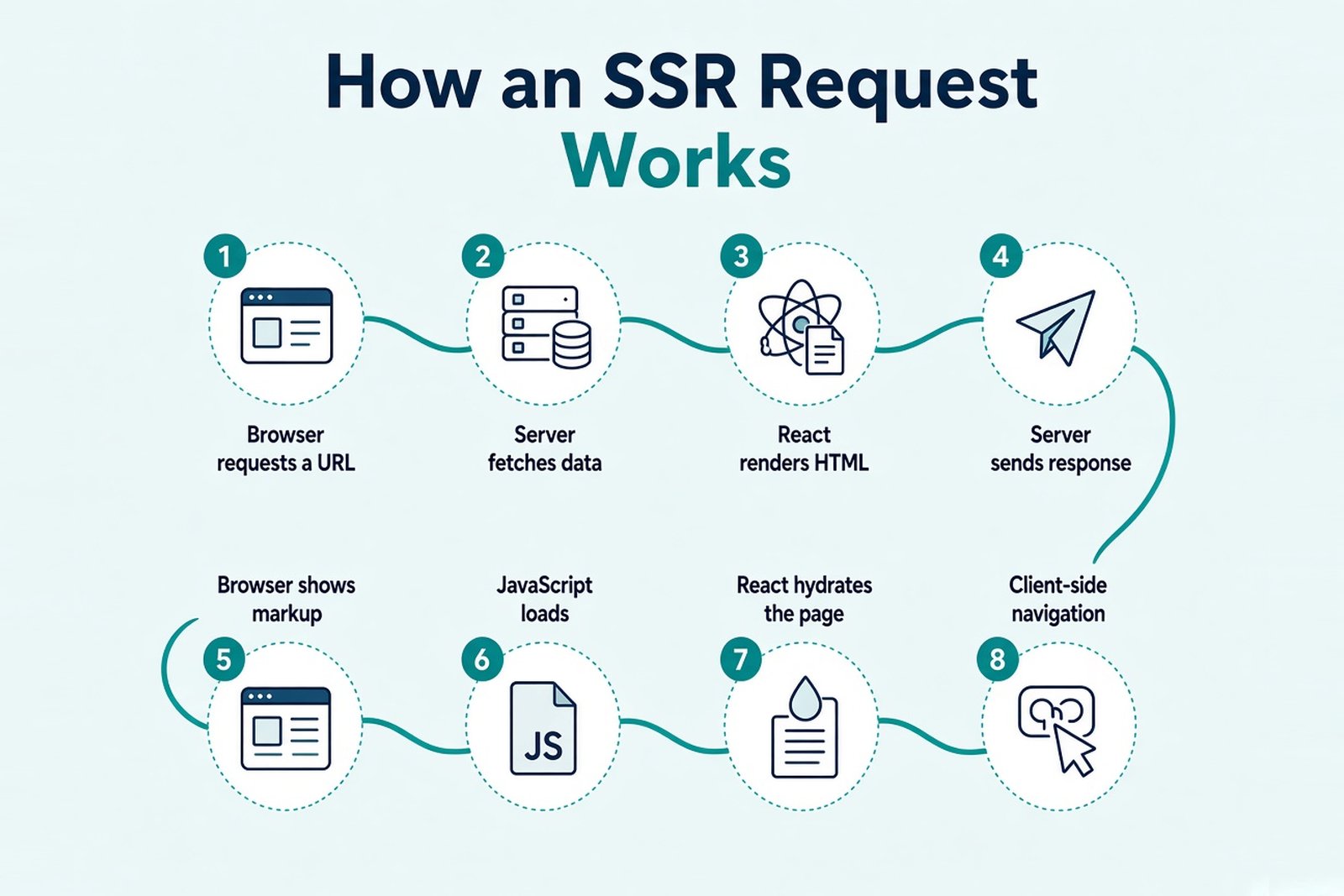
The server's work ends when the HTML is sent. Everything after that happens on the user's device.
There's a gap between steps 5 and 7, and it matters. Content can be visible before React is ready to respond to it. During that window, a React button looks normal but does nothing when clicked. In our example, with JavaScript disabled, the product page still showed its name and price, but the "Save for later" button didn't react.
That doesn't mean nothing works without JavaScript. Plain links and HTML forms are handled by the browser itself, so they work before hydration or even without it. Only behavior that depends on React's handlers has to wait.
And SSR doesn't remove client-side JavaScript. Interactive components still ship their code to the browser - they just start from HTML instead of an empty page.
SSR vs Client-Side Rendering vs SSG
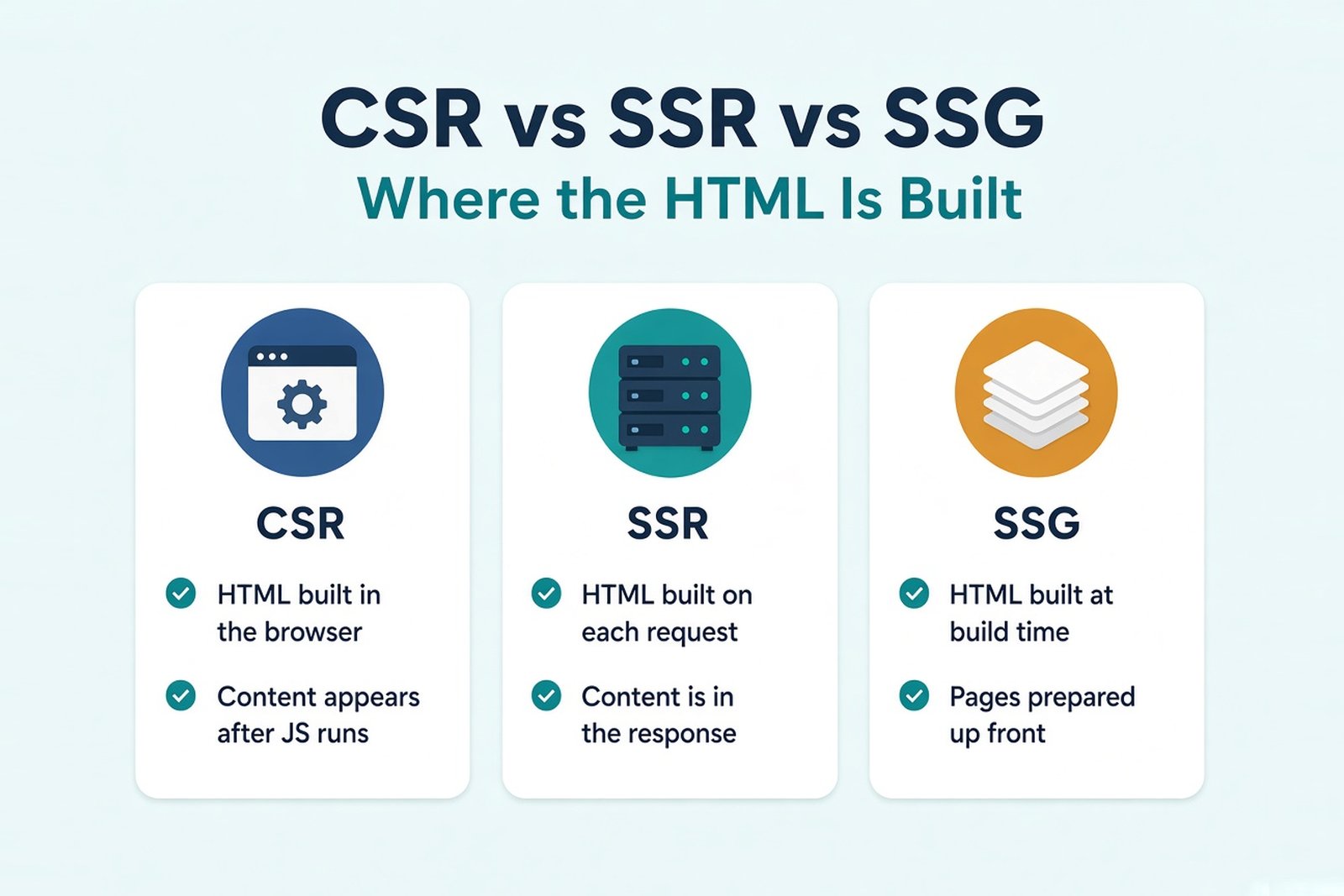
The three approaches differ mainly in when the HTML is created and where the content comes from:
| Criterion | Client-side rendering (CSR) | SSR | SSG |
|---|---|---|---|
| When the main HTML is built | In the browser | While handling the request | At build time |
| First content | Depends on running client code | Can be in the response | Prepared static HTML |
| Fresh data | Client-side requests | Server data, subject to caching | Rebuild, revalidation, or client requests |
| Infrastructure | Static frontend plus the APIs it needs | An environment that runs server code | Serving prepared files |
| Main limitations | First load and content availability | Server work, caching, hydration | Keeping prepared pages current |
Treat this as a map, not a guarantee. Each framework adds its own rules - Next.js, for example, can revalidate static pages or stream parts of a server-rendered one.
The approaches also combine well. A single product can use SSG for its documentation, SSR for product pages, and client-side rendering inside a logged-in dashboard. The decision is per route, not per project.
One more distinction. CSR, SSR, and SSG describe rendering. Single page vs multi-page applications describe something else - how navigation between views works. A server-rendered app can still navigate like an SPA after the first load.
SSR vs React Server Components
These two get mixed up constantly, partly because they often appear together. They answer different questions:
| Concept | What it defines |
|---|---|
| SSR | How HTML is produced for the browser |
| Server Components | Which components run outside the browser and never send their component code to the client |
| Client Components | Components that need browser features, state, or event handlers - and ship JavaScript |
| Hydration | How React attaches to prepared HTML for the interactive parts |
So SSR works without Server Components. React has done server rendering for years, long before RSC existed. And the two can work together: in the Next.js App Router, Server Components produce a payload, and the server uses that payload together with Client Components to render the initial HTML.
A Server Component's output isn't just an HTML file, by the way. It's a description of the rendered tree that React can use for the first HTML and for later client-side updates.
Server Components, Client Components, and Reusable Components
The name "Client Component" is misleading. It doesn't mean "rendered only in the browser." Client Components take part in the initial server render too - that's how our "Save for later" button appeared in the HTML before any JavaScript ran. The difference is that their code also goes to the browser, where they hydrate and become interactive.
In Next.js, the "use client" directive marks that boundary. It says: this module and what it imports belong to the client bundle. It doesn't turn off SSR for that component.
Reusable components fit on either side. A component that only takes props and returns markup, with no state, effects, or browser APIs, can be used from Server and Client Components alike. The moment it needs useState or an onClick, it has to live on the client side of the boundary.
How to Implement Server-Side Rendering in a React App
Let's build a public product page with a dynamic URL, server-side data fetching, a small interactive button, and a proper 404 for missing products. We'll use the Next.js App Router - it gives us routing, data loading, and hydration out of the box, so the example stays short.
Versions used: Next.js 16.3.8, React 19.2.8 (the version Next.js installs), Node.js 22.22.2. Next.js 16 requires Node.js 20.9 or newer.
Create the project
npx create-next-app@latest ssr-demo --js --app --no-tailwind --no-eslint --no-src-dir --no-react-compiler --import-alias "@/*" --use-npm --empty --yes
cd ssr-demo
These are the files we'll add or change:
app/
├── layout.js
├── page.js
└── products/
    └── [slug]/
        ├── page.js
        ├── save-button.js
        └── not-found.js
lib/
└── products.js
The data module
A local module stands in for a database, so the example doesn't depend on an outside API. The short delay mimics a real query:
import { cache } from "react";

const products = [
  {
    slug: "trail-backpack",
    name: "Trail Backpack 30L",
    description: "A light daypack with a rain cover and a padded laptop sleeve.",
    price: 129,
  },
  {
    slug: "camp-stove",
    name: "Compact Camp Stove",
    description: "A folding gas stove that boils a liter of water in about four minutes.",
    price: 59,
  },
];

// In a real app, this would query a database or an internal API.
export const getProduct = cache(async (slug) => {
  await new Promise((resolve) => setTimeout(resolve, 50));
  return products.find((product) => product.slug === slug) ?? null;
});
React's cache() makes sure that two calls with the same slug during one request - here, from the metadata and from the page - hit the data source once.
The page component
import { connection } from "next/server";
import { notFound } from "next/navigation";
import { getProduct } from "@/lib/products";
import SaveButton from "./save-button";

export async function generateMetadata({ params }) {
  const { slug } = await params;
  const product = await getProduct(slug);
  if (!product) return {};
  return { title: product.name, description: product.description };
}

export default async function ProductPage({ params }) {
  await connection(); // render this page at request time, not at build time
  const { slug } = await params;
  const product = await getProduct(slug);

  if (!product) notFound();

  return (
    <main>
      <h1>{product.name}</h1>
      <p>{product.description}</p>
      <p>Price: ${product.price}</p>
      <SaveButton />
      <p>Rendered at {new Date().toISOString()}</p>
    </main>
  );
}
The Client Component
"use client";

import { useState } from "react";

export default function SaveButton() {
  const [saved, setSaved] = useState(false);

  return (
    <button onClick={() => setSaved(!saved)}>
      {saved ? "Saved" : "Save for later"}
    </button>
  );
}
The not-found view
export default function ProductNotFound() {
  return (
    <main>
      <h1>Product not found</h1>
      <p>This product doesn't exist or is no longer available.</p>
    </main>
  );
}
For navigation, app/page.js lists both products with next/link, and the root layout sets a default title:
import Link from "next/link";

export default function Home() {
  return (
    <main>
      <h1>Products</h1>
      <ul>
        <li><Link href="/products/trail-backpack">Trail Backpack 30L</Link></li>
        <li><Link href="/products/camp-stove">Compact Camp Stove</Link></li>
      </ul>
    </main>
  );
}export const metadata = {
title: "Outdoor Store",
description: "A demo store for server-side rendering",
};
export default function RootLayout({ children }) {
return (
<html lang="en">
<body>{children}</body>
</html>
);
}Build, run, and check the HTML
npm run build
npm start
The build output marks each route. Ours showed ƒ /products/[slug] - Dynamic, server-rendered on demand. With the server running on port 3000, look at the raw HTML, before any JavaScript runs:
curl -s http://localhost:3000/products/trail-backpack | grep -o "<h1>[^<]*</h1>"
# <h1>Trail Backpack 30L</h1>

curl -s -o /dev/null -w "%{http_code}\n" http://localhost:3000/products/nope
# 404
Check the raw response, not the DOM in DevTools. The DOM shows the page after JavaScript ran, so it can't tell you what the server actually sent.
What happens where
- Data loading runs on the server, inside
getProduct(), before the HTML is created. - The HTML is created on the server for each request: name, description, price, and the button's initial markup are all in the response.
- The browser needs code only for
SaveButton- plus React and the Next.js runtime. The page component itself stays on the server. - Why it's SSR: the build marks the route as dynamic, and the "Rendered at" timestamp changed between two requests a second apart. A statically prepared page would show the same time every time.
- After hydration, the button toggles, and links to other products navigate on the client without a full reload.
About connection(): it tells Next.js to wait for a real request before rendering. In our test, the route was dynamic even without it - there's no list of known slugs. But once we added generateStaticParams to list the products, the build quietly turned both pages into static SSG. With connection() in place, the same change kept the route dynamic. So it's a small line that protects the rendering mode you actually chose.
The notFound() call runs before anything streams, so the response gets a real 404 status. Next.js also adds a noindex tag to that response. We didn't enable the optional Cache Components mode here - it changes the defaults toward partial prerendering, and this example is about classic request-time SSR.
Data Fetching and Hooks During SSR
If content must be in the server HTML, its data has to be ready before that part renders. How you do it depends on the framework. In the App Router, a Server Component can simply await the data, as our page does.
The classic mistake is fetching in useEffect. Effects don't run during server rendering at all - they run in the browser after hydration. So a request that lives only inside an Effect won't add anything to the initial HTML. The server sends a loading state, and the real content appears later, exactly like in client-side rendering.
Hooks have two different sets of rules here:
- In components that take part in SSR (like our Client Component),
useStateworks fine: its initial value is rendered on the server and appears in the HTML. "Save for later" came from exactly that. Effects are skipped on the server and run after hydration. - In Server Components, state and effect hooks aren't available at all. They don't re-render in the browser, so there's nothing for
useStateoruseEffectto do.
Browser APIs are the other trap. window, document, and localStorage don't exist on the server, and touching them during rendering breaks the server render. Moving the access into an Effect fixes that, because Effects only run in the browser. The cost: whatever depends on that value only appears after hydration. For a theme toggle that's fine. For the main content of the page, it defeats the point of SSR.
Hydration, Client-Side JavaScript, and Common SSR Errors
In practical terms, hydration means React takes the HTML the server already sent and connects its own tree to it, instead of building the page from scratch. For that to work, the first render in the browser has to produce the same markup the server did.
When it doesn't, you get a hydration mismatch. Typical causes:
- different data on the server and in the first client render
- random values, like
Math.random()or generated IDs - dates, locale, and time zones - the server and the user rarely share a clock
- branching on
typeof window !== "undefined"during render - invalid HTML nesting, such as a
<div>inside a<p>, which the browser silently rearranges - values from
localStorageor cookies the server couldn't read
This isn't a harmless warning. React discards the server HTML for the affected part and re-renders it on the client, which costs time and can cause visible flicker. When we rendered Math.random() in a Client Component, the production build threw React error #418 - a hydration mismatch - in the browser console. The broken clock below did the same in a browser set to a different time zone than the server; the fixed version didn't.
Here's the pattern, broken and fixed:
"use client";
import { useEffect, useState } from "react";

// Broken: the server and the browser print different times
export function LocalTimeBroken() {
  return <p>{new Date().toLocaleTimeString()}</p>;
}

// Better: render the same placeholder on both sides, then update in the browser
export function LocalTime() {
  const [time, setTime] = useState(null);
  useEffect(() => setTime(new Date().toLocaleTimeString()), []);
  return <p>{time ?? "Loading local time…"}</p>;
}
The broader rule: both sides need the same initial data. If the server rendered with some data, the client must start from that same data - frameworks handle this by sending it along with the page.
A few things not to do. suppressHydrationWarning is meant for single, expected differences such as a timestamp, not as a general fix. And don't switch off SSR for a whole page because one widget needs the browser. Keep SSR for the page. Move browser API access into an Effect, or load a browser-only widget with next/dynamic and { ssr: false } from a Client Component. Adding "use client" alone won't help here - that component still renders on the server. Next.js handles hydration itself, so you don't call hydrateRoot in a Next.js app.
Streaming SSR and Suspense
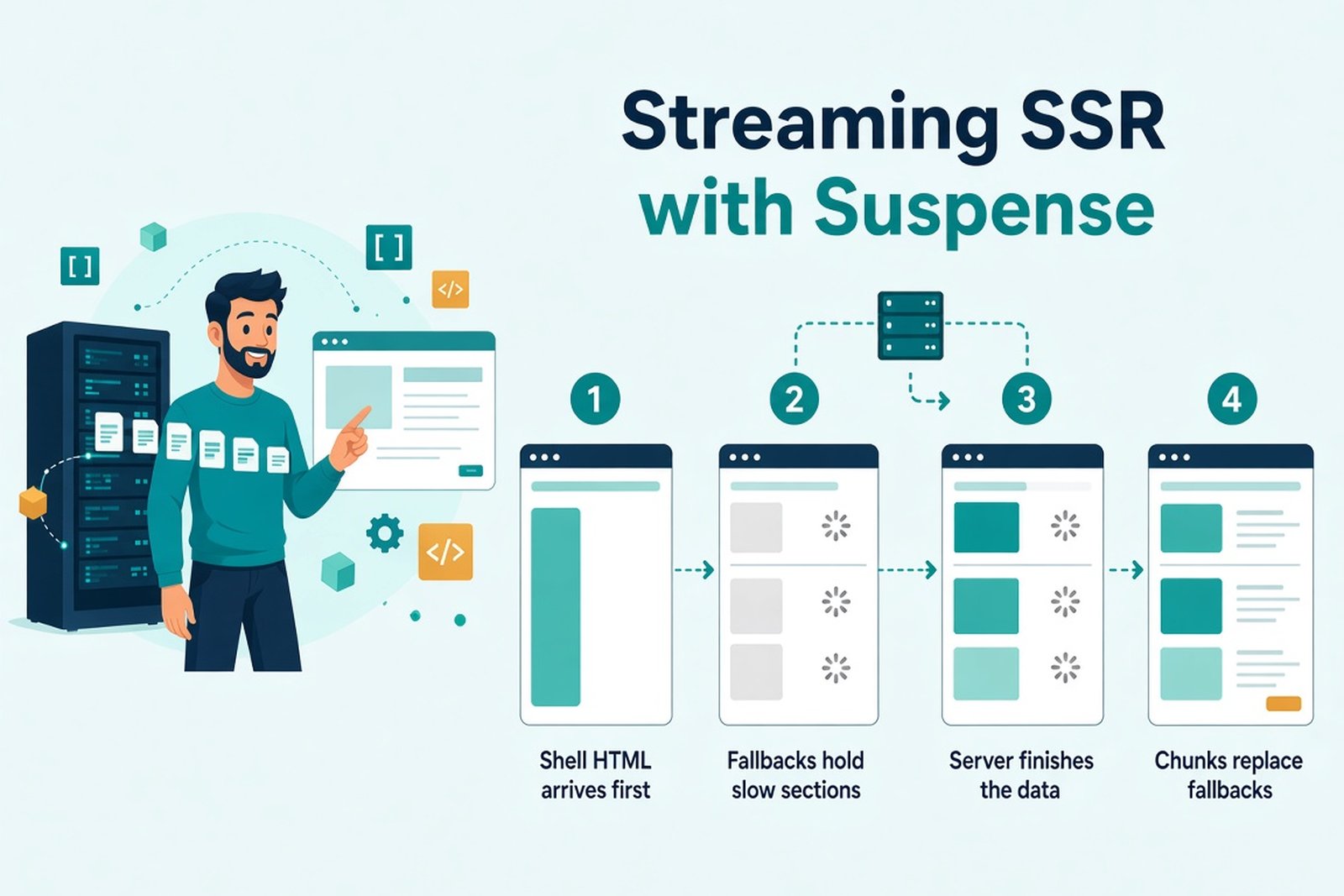
Without streaming, the server waits until the whole page is rendered, then sends it at once. One slow query holds up everything. With streaming, the server sends HTML in parts: the layout and ready sections go first, and slower sections follow as their data arrives.
The tool for this is <Suspense>. You wrap a slow part of the tree, give it a fallback like a skeleton, and React sends the fallback first, then streams the real content into its place. In Next.js, a loading.js file does the same for a whole route segment.
Keep expectations realistic, though:
- Suspense doesn't turn any fetch into streaming automatically. It works with data sources the framework or library integrates with Suspense.
- Streaming doesn't make a slow query faster. It only stops that query from blocking the rest of the page.
- Parts don't become interactive all at once. React can hydrate Suspense boundaries separately and prioritizes the ones the user interacts with.
Outside frameworks, React's streaming APIs are renderToPipeableStream for Node.js streams and renderToReadableStream for Web Streams. The older renderToString returns an HTML string synchronously. It doesn't support streaming or waiting for suspended data - suspended components render their Suspense fallback instead.
Infrastructure matters here too. Proxies such as Nginx buffer responses by default, and some CDNs do the same, which can turn a streamed page back into one delayed response. The Next.js docs suggest disabling buffering with the X-Accel-Buffering: no header for Nginx.
React SSR Performance and SEO
These are two separate questions, and SSR affects each one differently.
Performance
Where SSR can help: the main content can show up earlier, because the browser doesn't need to run JavaScript first. It also cuts the client-side chain of "load JavaScript, then request data, then render," which is slowest on weak phones and networks.
Where it costs you:
- data fetching now happens on the server before the response goes out
- generating HTML takes server time on every uncached request
- the client still downloads JavaScript for interactive parts
- hydration runs on the user's device
- the server runtime needs capacity, and traffic spikes land on it
So measure, don't assume. Useful metrics:
| Metric | What it shows |
|---|---|
| TTFB | How long the server takes to start responding - often higher with SSR |
| FCP and LCP | When content first appears, and when the main element does |
| INP | How quickly the page responds to input, which hydration can delay |
| Client JavaScript size | What the browser still has to download and run |
| Server latency and throughput | How the rendering server behaves under real load |
SSR rarely improves all of these at once. LCP can get better while TTFB gets worse, so look at them together, on real devices.
SEO
Ready HTML makes content easier to reach, but SSR doesn't guarantee indexing or rankings. Google does render JavaScript, as its JavaScript SEO guide explains. Not every crawler or link preview service does, though, and social previews often read only the raw HTML.
What to check on each public route:
- the main content is in the HTML response
- each page has its own URL
- links are real, crawlable
<a href>elements - title and meta description are unique per page
- the canonical URL is correct
- robots directives match your intent
- missing pages return a real 404, not a 200 page that says "not found"
Caching, Personalization, and Deployment
A client-rendered SPA can go on any static host. SSR needs somewhere to run server code - a Node.js server, a container, or a platform with serverless or edge functions. That doesn't have to mean a dedicated server you manage yourself.
Caching happens at several levels, and it's worth naming them separately:
- Data cache - reusing results of database or API calls
- Rendered response cache - reusing HTML that was already produced
- Browser and CDN cache - controlled by
Cache-Controland similar headers - Framework behavior - Next.js has its own rules, and they change between major versions
For each, decide how long it lives, what invalidates it, and how stale the data can be. A price that must be exact at checkout and a product description that changes monthly deserve different settings.
Our example shows the defaults in action. The dynamic product page came back with Cache-Control: private, no-cache, no-store, while the static home page was served from a prerendered cache. SSR doesn't rule out caching, and a CDN in front doesn't mean you're not doing SSR.
One hard rule: never put personalized HTML into a shared cache without separating users and permissions properly. If a page shows one customer's name, orders, or prices, a cached copy can leak to the next visitor. Frameworks help, but they don't solve privacy for you.
Check HTTP statuses separately, too. Once a streamed response has started, its status code is already sent and can't change - so run checks like notFound() before anything streams, as our example does.
When Should You Use SSR in React?
The kind of site is a starting point, not an answer. What each scenario really asks you to weigh:
| Scenario | What to evaluate |
|---|---|
| Public pages with changing data | How fresh the data must be, search visibility, acceptable response time |
| Catalog and product pages | Rendering per route, caching, how prices and stock stay accurate |
| Blog and documentation | Whether SSG is enough, and how updates get published |
| Customer account | Personalization, first load, whether SSR adds anything here |
| Dashboard | Interactivity, client-side data, users' devices |
| Mixed SaaS product | How the public site and the working app are split |
A few patterns come up again and again. Not every public page needs SSR - content that changes rarely is often fine with SSG, which is simpler to host and cache. Private apps can still benefit from SSR when there's a concrete reason, like a heavy first screen on slow devices. And you don't have to pick one mode for the whole product: decide route by route.
When you're weighing it, these criteria do most of the work:
- Data - how often it changes, and whether it's personal
- Users - their devices and networks
- SEO - which routes need organic traffic
- First load - how much the first screen matters for the product
- Infrastructure - whether you can run and monitor server rendering
- Team - experience with the framework and with debugging hydration
If you're planning a React front end, Softellar's React development services cover both client-side apps and server rendering with Next.js. For decisions that span frontend, backend, and hosting, see our web application development services.
Adding SSR to an Existing React App
You rarely need to rewrite everything. A step-by-step path works better:
- Pick the routes that actually need prepared HTML - often a few public ones.
- Audit dependencies and browser API access. Libraries that touch
windowat import time are the usual blockers. - Decide how each of those routes loads its data on the server.
- Check the initial markup and hydration: raw HTML first, then the console for mismatches.
- Set up deployment and caching for server rendering.
- Compare real user metrics before and after.
Migrating only the public routes first, while the rest of the app stays client-rendered, keeps the risk small. And be realistic: SSR won't fix a slow API, a tangled architecture, or oversized bundles. Those problems move to the server along with the rendering.
Choosing a Rendering Strategy for Web Development
SSR is worth it when prepared HTML solves a specific problem for your product - content that must be visible fast, pages that must be readable by crawlers and link previews, data that must be fresh on every request. Judge it together with data loading, hydration, caching, and the cost of running it.
Planning a new React application or modernizing an existing one? Talk to Softellar. We'll look at your routes, users, and infrastructure and help you pick the rendering approach that fits. We won't add a server to your stack unless it earns its place.