
React JS Case Study: Digital Medkit Ordering For Healthcare E-Commerce
Reduced configuration time by 80% and eliminated physical prototypes
Client
Global provider of medical supplies and technologies
Location
United States
Platform
Web (React frontend, .NET backend, Azure Cloud services)
Engagement Model
Dedicated Team
Team Size
5 specialists
Duration
12 months
Industries
Technologies
About The Customer
The Customer is a global provider of medical supplies and technologies serving various industries and focused on improving patient outcomes. One of their business units specializes in manufacturing and distributing custom and pre-packaged medical kits tailored for specific healthcare procedures. As part of their broader digital transformation strategy, the company wanted to eliminate manual errors and speed up the customization workflow for these kits by investing in a software-driven solution.
Key Highlights
- Full digitization of custom medical kit design and ordering process
- Visual tray configuration engine with real-time compliance validation
- Direct connection to live inventory for stock-aware component selection
- Drag-and-drop UI for component positioning and customization - one of the platform's unique features
- Drag-and-drop UI for component positioning and customization
- Cross-platform potential with React Native for future mobile access
Challenge: Custom Medical Kits Creating Process Automation
The Customer's custom kit creation process was entirely manual. Medical kits were first physically assembled, photographed, and sent back and forth between internal teams for review. Any client-specific requests - such as changing a tray layout or adjusting component quantity - required restarting the process from scratch, often leading to the same mistakes and delays. As a result, turnaround times were long, engineering teams were overloaded, and miscommunication between departments often led to costly errors.
The company faced significant technical challenges in building a web platform to replicate this process digitally. It needed to allow users to visually design trays using live inventory data while ensuring compliance with layout and manufacturing rules. The platform had to be flexible enough for client-specific customizations, but strict enough to prevent invalid configurations. The final digital platform solution would need to replace static prototypes with dynamic digital samples usable directly for production.
Project Team Composition
- 1 Senior .NET Backend Developer (business logic, API integration)
- 1 Senior React Frontend Developer (high technical proficiency in React interface, kit builder, real-time tray visualization)
- 1 UI/UX Designer (tray layout usability, customization workflows, user flows)
- 1 QA Engineer (layout validation, rule-based testing, UI regression)
- 1 Project Manager / Business Analyst (requirements analysis, delivery coordination, stakeholder alignment)
Digital Medical First Aid Kit React.js Solution
Softellar's team of experts provided the Customer with a custom development service and solution that revolutionized their custom medical kit creation process.
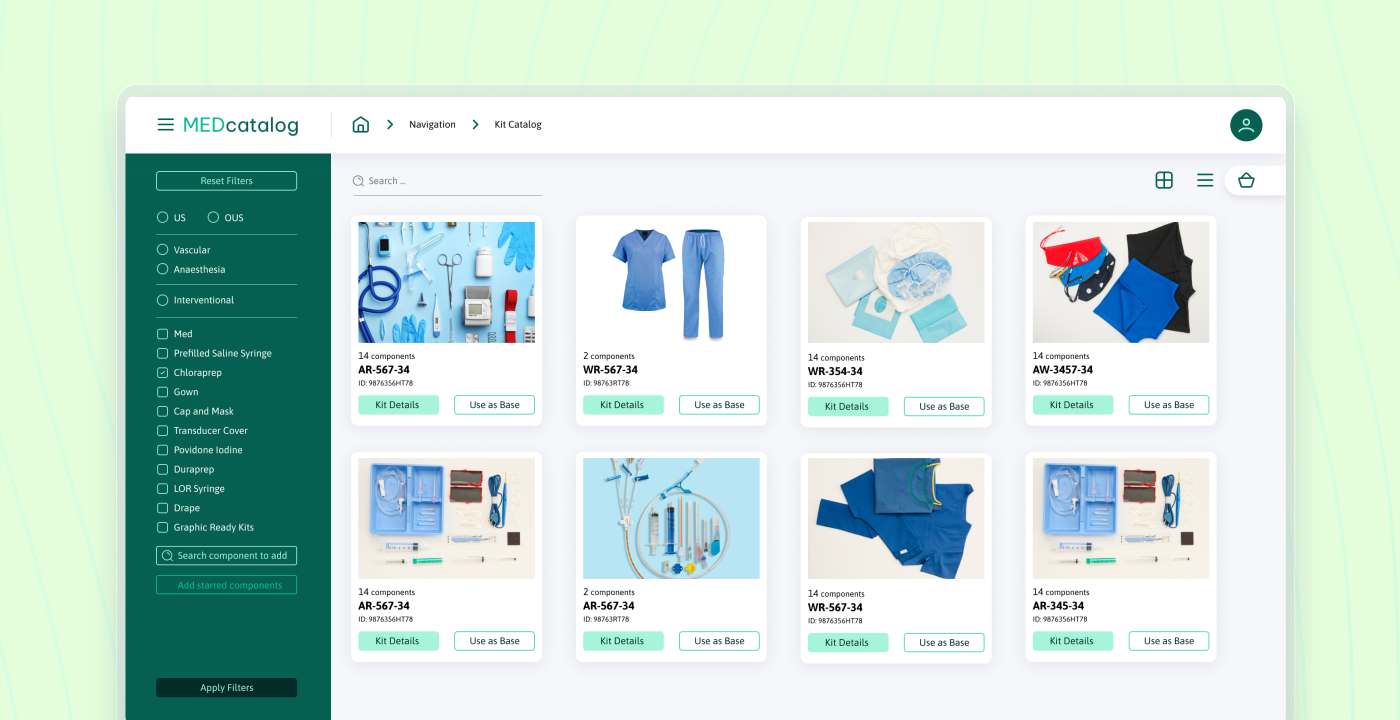
The first step was to develop the Med Catalog react app, a digital solution that enables users to design and customize medical kits without the need for physical boxes. This app allows users to start with a base kit and tailor it to their specific needs by adding or removing contents currently available in stock.
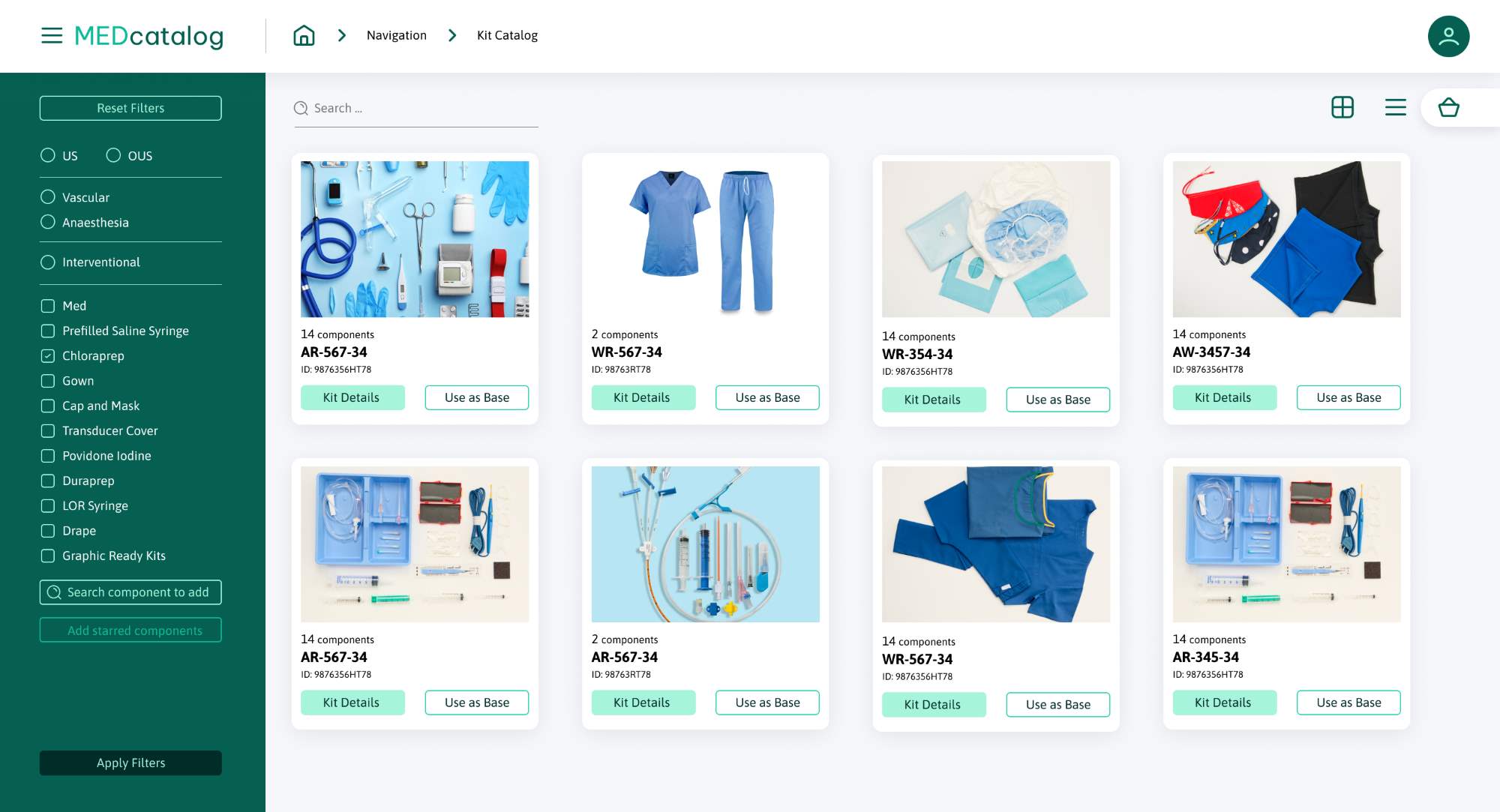
To ensure each component is optimally placed, the app uses an automatic layout feature with predefined rules for tray placement. This combination of customization and automated layout rules ensures every kit is optimized for its intended purpose, saving time and reducing the margin for error.
Additionally, the Med Catalog app allows admin users to update tray placement rules to adhere to the Customer's manufacturing standards and limit component placement to available positions. This feature enhances communication between clients, sales representatives, engineers, and production teams.
With just a few clicks, users can customize or swap components, trays, and tags. The app also enables users to change attributes of components such as quantity, rotation, position, or image version. Once a custom kit is created, the app simplifies the ordering process by generating digital samples with all necessary information, including itemized lists, quantities, and customizations.
Kit Designer UI (React)
The tray designer was developed using React Hooks with robust state management, avoiding heavy refreshes of the entire page and providing an interactive drag-and-drop experience for building custom medical kits. Users could visualize component placement within trays using interactive components, with an efficient render method updating the preview instantly as they rotated items, assigned custom labels, and checked layout validity. The interface synced in real-time with the backend inventory system to reflect stock levels and prevent out-of-stock selections, ensuring a seamless user experience. It was optimized for both speed and accessibility, reducing cognitive load for users. The fully responsive interface allowed sales and engineering teams to work collaboratively across locations and devices.
Tray Logic Engine (.NET)
All tray layouts were validated server-side by a .NET-based engine that enforced rules related to spacing, allowable orientations, tray dimensions, and component compatibility. These rules were stored in a configuration database and could be dynamically updated without code changes. This ensured that every submitted design met production and compliance standards, eliminating layout-related errors downstream.
Admin Configuration Panel
To support rule evolution and kit standardization, the system included a secure admin dashboard where business users could manage tray types, update layout logic, restrict positions, and define allowable combinations. This capability empowered non-developers with actionable insights to update logic as production standards evolved - without involving developers or restarting releases.
Digital Sample Generator
Completed tray designs were automatically converted into a digital sample - a structured document containing a layout map, itemized list, quantities, and custom labels. These documents were immediately usable by warehouse and production teams, significantly accelerating order fulfillment. The generated samples followed internal production formatting and could be shared externally with clients for approvals.
Azure-Based Hosting & Services
The application was deployed on Microsoft Azure, with frontend assets served via Azure App Service and APIs connected to Azure SQL Database. Cloud-native architecture ensured scalability, centralized logging, and performance stability even under high traffic loads, providing an efficient service. Azure's built-in monitoring allowed the team to detect and fix UI or logic issues early during post-launch operations.
Our Approach
Softellar followed a structured five-phase delivery plan to meet tight deadlines and build the solution with full visibility and minimal disruption to the Customer's existing process:
- Requirements & Research
Gathered requirements from sales, engineering, and operations teams
Audited legacy workflow and physical prototyping steps
Defined tray logic rules and inventory integration needs - Prototyping & Validation
Delivered clickable UI mockups and tray logic schema proposals
Conducted rule validation exercises with engineering and compliance teams
Identified UX bottlenecks and refined drag-and-drop experience - Development & Integration
Streamlined the development process by building out the React interface with a focus on component reusability (and React Native-ready patterns) and .NET backend
Integrated live inventory and rule management engine
Enabled tray logic overrides for future customizations - QA & User Testing
Paid careful attention to detail by performing rule validation tests across tray types
Conducted manual and automated UI tests for layout accuracy
Coordinated feedback rounds with real users in pilot groups - Launch & Handover
Deployed to Azure Cloud with secure access controls
Delivered user training sessions and quick-start guides
Provided ongoing support, a versioning roadmap, and documented lessons learned
Results & Impact
The launch of the Med Catalog platform (with a React Native-compatible core) helped the Customer eliminate their manual kit prototyping workflow and replace it with a fully digital, rules-driven design experience. What previously took days of manual coordination and physical reviews could now be done in under an hour, with full traceability and visual output, thanks to the power of React technology.
Business Outcomes
- Reduced kit configuration turnaround time by 80%
- Eliminated physical prototyping, photography, and manual layout validation
- Gathered valuable insights that improved internal team coordination through a shared digital workspace serving as an intuitive learning environment, directly boosting customer satisfaction
- Enabled faster customer feedback loops, higher satisfaction, and a seamless user experience throughout the configuration process
Technical Outcomes
- Fully reactive UI with real-time tray validation and fast load times, architected to support server-side rendering and service workers for optimal performance
- Backend logic engine supporting rule changes without code redeployments, significantly improving development efficiency and operational agility
- Hosted on Azure App Service with secure data handling and optimized app's performance, ensuring better performance and user experience
- Scalable architecture ready for future expansion, setting a benchmark for complex React applications in enterprise and a solid foundation for the next project, with a path to adopt React Native for mobile
Tools & Technologies
Underlying technology stack:.NET, C#, RESTful API, ASP.NET Web API, MSSQL, Azure App Service, Azure Cloud Services, ESLint, React (open source JavaScript library), React Native (for future roadmap)
Streamline Your Product Configuration
Digitize and automate your processes with custom web solutions.
Related Case Studies

Fintech Cloud Case Study: AI Lending Platform on Azure for U.S. Private Credit
Industries:
Technologies:
Accounting Platform Modernization: Cloud-Native SaaS for a U.S. Payroll Software Provider
Industries:
Technologies:

Case Study: Microsoft Azure-Powered SaaS Invoice Recognition System
Industries:
Technologies: