
Overview
C# and Java look like close relatives, and in many ways they are. Both are statically typed, object-oriented languages with C-style syntax, garbage collection, and mature ecosystems for web, cloud, and enterprise software. A developer who knows one can read the other on day one. Writing good code in it takes longer.
The differences that matter sit a layer deeper - in how each runtime handles generics and value types, how the compiler treats exceptions and null, and how each platform deals with concurrency. This guide walks through those differences with side-by-side code, then turns them into practical criteria for choosing a stack.
What Is the Difference Between C# and Java?
C# is a language that usually runs on .NET. Java is a language that usually runs on the Java Virtual Machine (JVM). Frameworks like ASP.NET Core and Spring Boot sit on top of those runtimes - they're part of the ecosystem, not the language itself. Keep those three layers apart and most comparisons get a lot clearer.
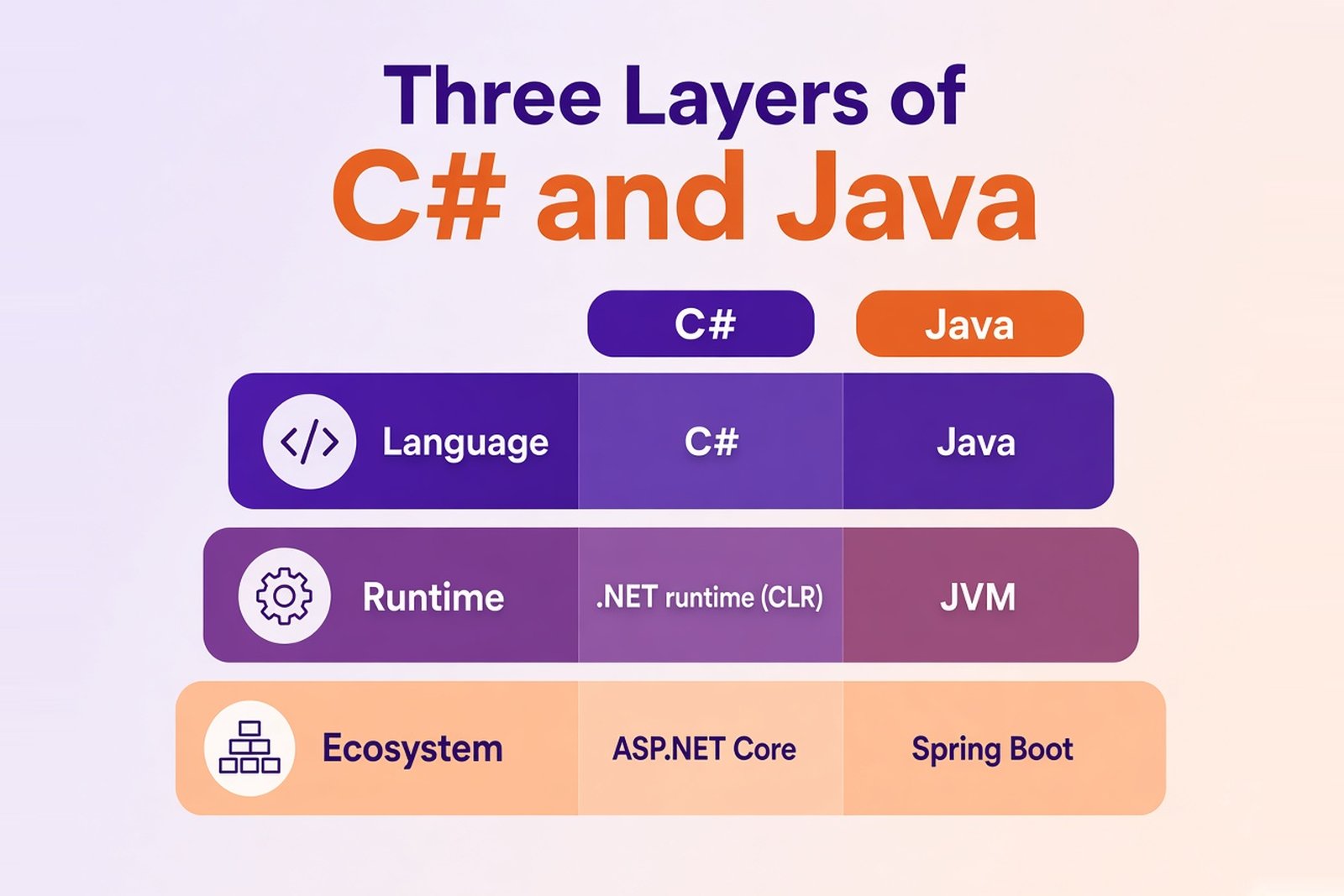
Here's the short version:
| Area | C# | Java |
|---|---|---|
| Runtime | .NET runtime (CLR) | JVM (HotSpot and other implementations) |
| Compiled to | Intermediate Language (IL), then JIT or Native AOT | Bytecode, then JIT; native images via GraalVM |
| Cross-platform | Windows, Linux, macOS on modern .NET; some UI frameworks are Windows-only | Windows, Linux, macOS and more; native libraries can limit portability |
| Type system | Unified: int is a struct, user-defined value types via struct | Primitives are separate from objects; no user-defined value types in stable releases |
| Generics | Kept at runtime (reified) | Erased at compile time |
| Properties | Built into the language | Getter and setter methods; records generate accessors |
| Data queries | LINQ, including queries translated to SQL | Stream API for in-memory processing |
| Exceptions | Unchecked only | Checked and unchecked |
| Null safety | Nullable reference types (compile-time warnings) | No language-level feature; Optional and annotations |
| Concurrency | Task and async/await | Executors, CompletableFuture, virtual threads |
| Common backend framework | ASP.NET Core | Spring Boot |
| Build and packages | .NET CLI, MSBuild, NuGet | Maven or Gradle, Maven Central |
Common Ground: Object-Oriented Programming and Static Typing
Both languages are built around object-oriented programming. Classes, interfaces, inheritance, access modifiers, method overloading - it all works the way you'd expect, in both. Both are statically typed, so the compiler catches type mismatches before the program ever runs. That alone separates them from Python or JavaScript.
The daily toolkit overlaps a lot too:
if,for,while,switch, andtry/catchread almost identically- memory is managed by a garbage collector, so you don't free objects by hand
- lambdas, generics, records, and pattern matching exist in both, even if they behave differently
- large standard libraries for strings, collections, files, networking, and dates
So yes, switching is easier than moving from, say, Python to Rust. But similar syntax doesn't make code or libraries interchangeable. A Spring service won't run on .NET, and a NuGet package won't help a Java team. Conventions, APIs, and the way applications are structured differ, and that's where the learning curve actually is.
Key Differences Between C# and Java
Runtime, Compile Time, and Cross-Platform Support
Neither language compiles straight to machine code by default. At compile time, the C# compiler turns source into Intermediate Language (IL) packed into assemblies, and javac turns Java into bytecode in .class and JAR files. At runtime, the CLR or the JVM loads that code and a just-in-time (JIT) compiler turns hot paths into native instructions. Same idea, two separate implementations.
Both platforms also offer ahead-of-time options. .NET has Native AOT, which produces a self-contained native executable with fast startup. Java has GraalVM Native Image, and recent JDKs add an AOT cache that speeds up startup on the regular JVM. The catch is similar on both sides: reflection-heavy code and some libraries need extra configuration or don't work at all.
Cross-platform support is where outdated advice lingers. C# is not a Windows-only language. That was true of the old .NET Framework, not of modern .NET, which runs on Windows, Linux, and macOS and is widely deployed in Linux containers. Some parts of the stack are still Windows-specific, like WPF and Windows Forms, and C# has close access to Windows APIs through P/Invoke and COM.
Java's "write once, run anywhere" holds up well for pure Java code. It gets less universal once you depend on native libraries through JNI or the newer Foreign Function & Memory API.
The practical takeaway: check portability at the level of your application and its dependencies, not the language name.
Syntax, Properties, and Data Queries
Some differences show up within the first hour. C# has properties as a language feature: public decimal Balance { get; private set; } gives you a field with controlled access in one line. Java has no properties. You write getBalance() and setBalance() methods, or let a record or a tool like Lombok generate them. Same result, more ceremony.
Strings are close. Both have immutable strings, + concatenation, and multi-line literals (raw string literals in C#, text blocks in Java). C# adds interpolation with $"Balance: {balance}", while Java uses String.format() or "...".formatted(). Java did try string templates as a preview feature, then withdrew them, so don't expect them in current releases.
The bigger difference is how you query data. Here's the same task in both languages: take a list of words, keep the ones longer than three characters, convert them to uppercase, sort them, and join the result into one string.
string[] words = { "java", "c#", "linq", "stream", "api", "record" };

string result = string.Join(", ", words
    .Where(word => word.Length > 3)
    .Select(word => word.ToUpper())
    .OrderBy(word => word));

Console.WriteLine(result); // JAVA, LINQ, RECORD, STREAMvoid main() {
List<String> words = List.of("java", "c#", "linq", "stream", "api", "record");
String result = words.stream()
.filter(word -> word.length() > 3)
.map(String::toUpperCase)
.sorted()
.collect(Collectors.joining(", "));
IO.println(result); // JAVA, LINQ, RECORD, STREAM
}Both snippets use the short program form each language supports now: top-level statements in C#, compact source files in Java 25. No public static void main(String[] args) boilerplate required.
The code looks almost the same. The machinery behind it doesn't. Both pipelines are lazy, but a Java stream can be consumed only once, while a LINQ query can be enumerated again. And LINQ goes further than collections: through IQueryable, Entity Framework Core translates the same kind of query into SQL that runs in the database. The Stream API works on data already in memory. For database queries, Java teams use JPA, jOOQ, or similar libraries.
So they overlap. They're not the same thing.
Type Systems and Generics
C# has a unified type system. Every type, including int and bool, derives from System.Object, and you can define your own value types with struct. A value type holds its data directly, so assigning it copies the value instead of sharing a reference. Where it's actually stored depends on context - a struct inside a class lives on the heap along with the class.
Java splits the world in two. Primitives like int, double, and boolean aren't objects and have no methods. Everything else is a reference type. You can't define your own value types in stable Java releases yet. Project Valhalla is working on that, but it's not something to plan a production system around today.
Generics follow the same split. In C#, generics are reified: List<int> stores plain integers without boxing, and the type argument is still known at runtime. Java uses type erasure. The compiler checks List<Integer> at compile time, then removes the type argument, so at runtime it's just a List. That's why Java can't have List<int>, can't do new T(), and boxes numbers in generic collections. It rarely matters for business logic. It does matter for numeric-heavy code and for libraries built on reflection.
Records show the same pattern: similar at first glance, different underneath. Here's an account with a balance, and a copy with an updated value.
var account = new Account("ACC-1", 100.50m);
var updated = account with { Balance = account.Balance + 20m };

Console.WriteLine(account == updated); // False
Console.WriteLine(updated);            // Account { Id = ACC-1, Balance = 120.50 }

public record Account(string Id, decimal Balance);record Account(String id, BigDecimal balance) {
Account withBalance(BigDecimal newBalance) {
return new Account(id, newBalance);
}
}
void main() {
var account = new Account("ACC-1", new BigDecimal("100.50"));
var updated = account.withBalance(account.balance().add(new BigDecimal("20")));
IO.println(account.equals(updated)); // false
IO.println(updated); // Account[id=ACC-1, balance=120.50]
}A few things to notice. C# has a built-in decimal type for money, so the math reads like normal arithmetic. Java uses the BigDecimal class from the standard library, which is precise but method-based. C# gives you with to copy a record with changes, and in Java 25 you write that method yourself. C# also lets you override == - records do it for you - while Java compares objects with equals().
There's more under the hood. A C# record is a reference type by default, and record struct makes it a value type. A Java record is always a final reference type. In both languages, immutability is shallow: if a record holds a mutable list, the list can still change.
The point: type system differences shape how you design APIs, collections, and data models. They're not just syntax.
Smaller Language Differences Worth Knowing
None of these will decide your stack. You'll run into them in code reviews anyway.
| Feature | C# | Java |
|---|---|---|
| Unsigned integers | byte, ushort, uint, ulong | None, apart from char; helper methods for unsigned math |
| Operator overloading | Supported for user-defined types | Not supported |
| Method references and callbacks | Delegates and events | Functional interfaces, lambdas, method references |
| Adding methods to existing types | Extension methods (extension members in C# 14) | No equivalent; default methods only work inside interfaces |
| Code organization | namespace, not tied to folders | package, mapped to the directory structure |
| Passing arguments | By value, or by reference with ref, out, in | Always by value (object references are copied) |
| Pointers | Allowed in unsafe code blocks | Not available |
Both languages now have switch expressions and pattern matching, so that's no longer a real difference.
How C# and Java Throw and Handle Exceptions
Both languages throw exceptions with throw and handle them with try, catch, and finally. The syntax is nearly the same. The rules aren't.
Java has checked exceptions. If a method can fail with, say, an IOException, the compiler forces you to either catch it or declare it with throws IOException in the method signature. Unchecked exceptions, like IllegalArgumentException, skip that check. C# has no checked exceptions at all. Any method can throw anything, and the signature won't tell you.
What does that mean in practice? Java makes failure part of the contract - you see it right in the code, which is useful, but it also spreads throws clauses through layers that don't care, and some teams end up wrapping everything in unchecked exceptions. C# keeps signatures clean and leaves error contracts to documentation, tests, and code review. Neither approach makes an application reliable by itself.
A couple of smaller rules differ too. C# won't let you return or jump out of a finally block. Java allows it, and a return in finally can silently swallow an exception that was already on its way up. C# also has exception filters (catch (HttpRequestException e) when (e.StatusCode == HttpStatusCode.NotFound)), and Java has multi-catch (catch (IOException | SQLException e)).
Null Handling
C# has nullable reference types. When they're enabled, string means "should never be null" and string? means "might be null", and the compiler warns you when you get it wrong. They're warnings at compile time, though, not runtime guarantees - a null can still slip in from untyped data or an ignored warning.
Java has no language-level equivalent. The common tools are Optional for return values that may be empty, plus annotations such as JSpecify combined with static analysis. Optional isn't meant for fields or parameters, so it doesn't solve the same problem as nullable reference types. Related, not equivalent.
The practical conclusion is the same for both topics: reliability comes from how your team designs contracts, handles errors, and reviews code. The language only gives you the tools.
Resource Management
Garbage collection frees memory. It doesn't close files, database connections, or network sockets - at least not when you need them closed. Both languages have a construct for releasing those resources at a predictable point. Here's the same task: read the first line of a file and close it properly.
using var reader = new StreamReader("input.txt");

string? firstLine = reader.ReadLine();
Console.WriteLine(firstLine ?? "(empty file)");
// reader is disposed at the end of the scopeimport java.io.BufferedReader;
import java.io.IOException;
import java.nio.file.Files;
import java.nio.file.Path;
void main() throws IOException {
try (BufferedReader reader = Files.newBufferedReader(Path.of("input.txt"))) {
String firstLine = reader.readLine();
IO.println(firstLine != null ? firstLine : "(empty file)");
} // reader is closed here
}The idea is identical: using works with any type that implements IDisposable, and try-with-resources works with any AutoCloseable. Both close the resource even if an exception occurs. Two visible differences come straight from the earlier sections. Java has to declare throws IOException, a checked exception. And C# marks the possibly empty result as string?.
If a file is missing, both programs throw at runtime. Neither language checks that for you at compile time.
Concurrency and Asynchronous Programming
This is where the two platforms really went separate ways.
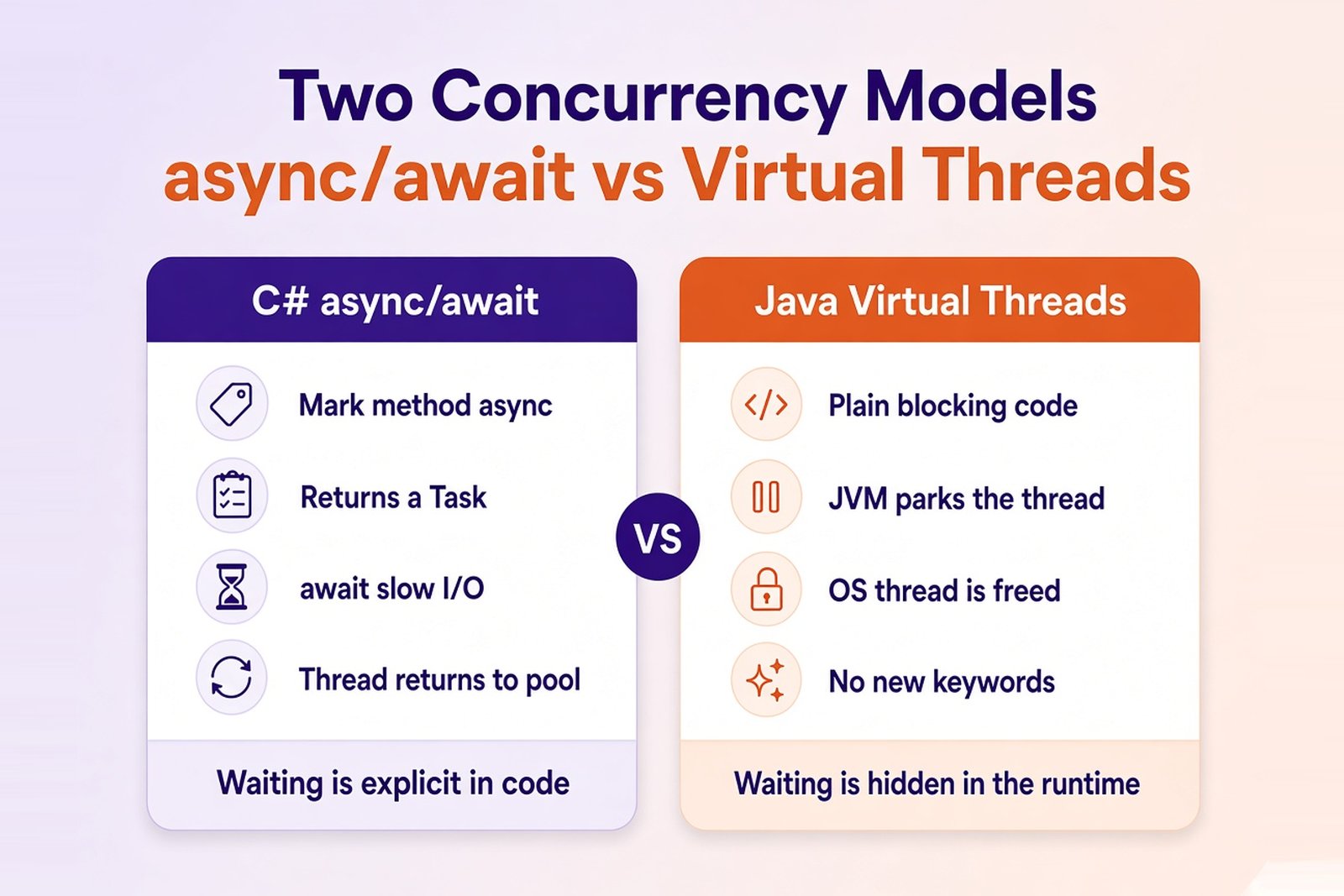
C# built asynchronous programming into the language. You mark a method async, it returns a Task, and you await slow operations like HTTP calls or database queries. While the method waits, the thread goes back to the pool to serve other work. C# popularized this model, and many languages later borrowed it. The trade-off is that async spreads: once a low-level method is async, its callers usually become async too.
Java went through several stages. There are thread pools through ExecutorService, and CompletableFuture for composing asynchronous steps. Since Java 21 there are virtual threads - lightweight threads managed by the JVM. You write plain blocking code, and when a virtual thread waits for I/O, the JVM parks it and frees the underlying OS thread. One server can run hundreds of thousands of them. No new keywords, and no async spreading through the call chain.
Two different models, then. C# makes waiting explicit in the code. Java hides it in the runtime.
A few things are true for both:
- async/await and virtual threads help with I/O-bound work - lots of requests waiting on networks and databases
- they don't make CPU-bound work faster; for that you need real parallelism, like
Parallel.ForEachand PLINQ in C# or parallel streams andForkJoinPoolin Java - scaling stops where shared resources run out. Ten thousand concurrent requests still share one database connection pool and whatever rate limit your payment provider has.
So don't compare keywords. Compare how each model fits your workload and your team's habits.
Not Sure Which Stack Fits Your Backend?
Softellar's engineers work with both ASP.NET Core and Spring Boot. We can review your requirements, integrations, and team skills and recommend the platform that will be easier to build and maintain.
C# vs Java for Backend Development
On a real backend project, you spend more time with the framework than with the language. So a fair comparison looks at the working stack: ASP.NET Core on one side, Spring Boot on the other.
| Task | ASP.NET Core | Spring Boot |
|---|---|---|
| HTTP APIs | Minimal APIs or controllers | Spring MVC, or WebFlux for reactive apps |
| Dependency injection | Built-in container | Spring's IoC container |
| Database access | Entity Framework Core, Dapper | Spring Data JPA with Hibernate, jOOQ |
| Configuration | appsettings.json, environment variables, options pattern | application.yml or .properties, profiles |
| Testing | xUnit, NUnit, MSTest | JUnit 5, Mockito, Testcontainers |
| Containers | Built-in container publishing in the .NET SDK | Buildpacks via Maven or Gradle plugins |
| Observability | OpenTelemetry, built-in metrics and logging | Micrometer, Spring Boot Actuator, OpenTelemetry |
Both stacks cover the typical backend needs out of the box. Neither has a gap you'd have to engineer around for a standard API, a SaaS product, or an internal enterprise system. Spring's ecosystem is older and wider - there's a Spring module or a JVM library for nearly every integration you can think of. ASP.NET Core is more tightly integrated. More comes from one vendor, with fewer choices to make.
How fast the team actually ships depends on things neither framework controls: the team's experience with the stack, the quality of existing code, integration requirements, and how testing and releases are organized. A strong Spring team will outpace a new .NET team, and the other way around.
If you're building on the JVM, Softellar's Java development services cover Spring Boot APIs, microservices, and data-heavy systems. For the Microsoft stack, our .NET development services focus on ASP.NET Core, Azure, and modernization of existing .NET applications.
Tooling: Visual Studio, IntelliJ IDEA, and Build Systems
For C#, Visual Studio is the classic IDE on Windows, with strong debugging and profiling. On macOS and Linux, developers use JetBrains Rider or VS Code with the C# Dev Kit - Visual Studio for Mac has been retired. Builds run through the .NET CLI and MSBuild, and packages come from NuGet.
For Java, IntelliJ IDEA is the most common choice, with Eclipse and VS Code as alternatives. Builds and dependencies are handled by Maven or Gradle, pulling from Maven Central. Gradle is more flexible, and Maven is more predictable. Teams argue about it. A lot.
C# vs Java Performance: What Should You Measure?
Short answer: neither language is faster in general. Both run on mature JIT-compiled runtimes, and benchmark results swing with the workload, the versions, and who tuned what. A table that says "C#: fast, Java: medium" tells you nothing.
What's worth measuring instead:
| Metric | What it tells you |
|---|---|
| Latency | How long one request takes, especially at the 95th and 99th percentiles |
| Throughput | How much work the service handles per second |
| Memory usage | How much RAM it needs under a given load |
| Startup time | How fast a new instance is ready - matters for serverless and autoscaling |
| CPU usage | How much compute each request costs |
| Infrastructure cost | What it costs to hit your target service level |
The results depend on the runtime version, JIT or AOT compilation, warm-up, garbage collector and memory settings, the libraries in use, calls to databases and external services, and the hardware. In most business applications the database and the network dominate response time anyway. The language is rarely the bottleneck.
If performance is a hard requirement, don't pick a stack from someone else's benchmark. Build a small prototype of your most demanding scenario, run it on your target infrastructure, and compare real numbers.
How to Choose Between C# and Java for Your Project
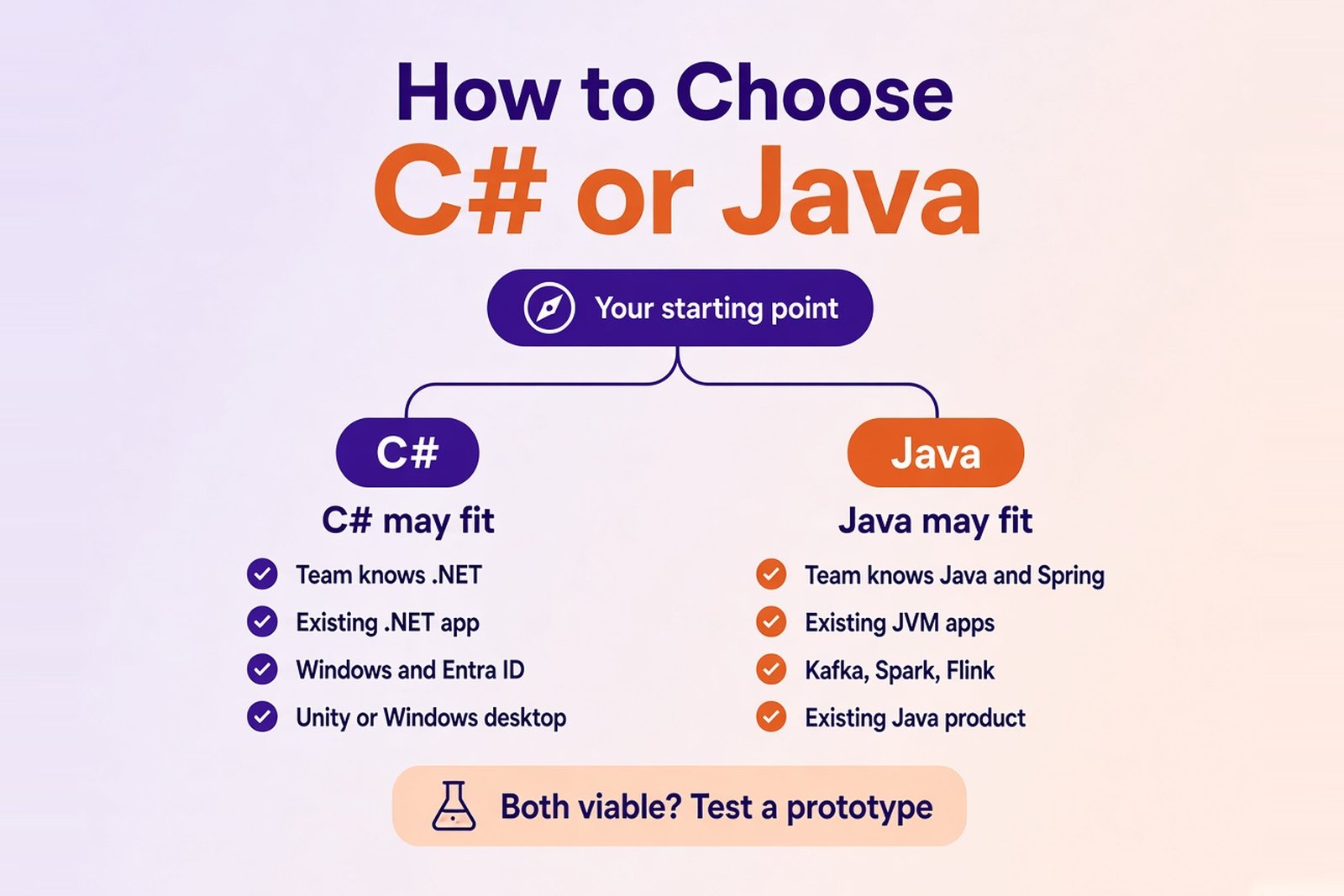
The language features above matter less than your starting point. In most projects, the decision comes down to what you already have and who will build and maintain the system.
When C# May Be a Strong Fit
- Your team already knows .NET and ASP.NET Core.
- The existing application, or its key libraries, is built on .NET. Extending it in C# avoids a second stack.
- You need integrations that have mature .NET components - Windows services, Active Directory and Entra ID, Office file formats, or legacy COM libraries.
- The product includes a Unity game or a desktop client for Windows, and sharing code and developers with the backend helps.
That said, using Azure doesn't require C#. Java runs on Azure just fine, and C# runs on AWS and Google Cloud.
When Java May Be a Strong Fit
- Your company already runs JVM applications and has people who operate them.
- The team is experienced with Java and Spring.
- Key components live in the JVM ecosystem. Kafka Streams, Spark, Flink, Hadoop - if your platform is built around them and you write custom jobs or connectors, a JVM language fits naturally.
- You're extending or supporting an existing Java product, where a second language would only split the team.
An industry alone isn't a reason. "Java is best for banking" says nothing about your requirements.
When Both Are Viable
For a new SaaS product or backend, both stacks will do the job. These questions help settle it:
| Question | How it affects the choice |
|---|---|
| Which stack does the team already know? | Affects time to launch and quality of the first release |
| Which systems do you need to integrate with? | Defines the libraries, SDKs, and protocols you depend on |
| What are the deployment constraints? | Narrows down supported platforms, containers, and hosting |
| What load do you expect? | Tells you what to test on a prototype |
| Who will maintain the application? | Affects hiring and knowledge transfer over the years |
| What budget is acceptable? | Requires estimating development, infrastructure, tooling, and support together |
On budget: neither language is cheaper by default. Both runtimes and the main frameworks are open source. Cost comes from developer time, infrastructure, commercial tools, and long-term support - and those depend on the team and the architecture, not the language.
Should You Migrate Between Java and C#?
Usually, no - not for the language alone. Nicer syntax or a feature you envy won't pay back the cost of a rewrite.
A migration needs its own business case. Before you start, look at:
- the actual limitation of the current system, and whether it's really caused by the language
- the cost of rewriting and re-testing every feature
- whether you have, or can hire, a team for the new stack
- which dependencies and integrations have no direct equivalent
- the risk of subtle behavior changes, from rounding to date handling
- whether a step-by-step modernization would get you there with less risk
Be honest about the root cause. Slow releases, fragile tests, or an overloaded database won't disappear after a rewrite. They'll just move to the new codebase.
Often the safer path is step-by-step modernization that keeps the business logic intact. In one of our projects, Softellar turned a desktop-era accounting and payroll suite into a cloud-native SaaS platform built on .NET 8, ASP.NET Core, and Azure. Nothing was switched overnight: the team delivered in phases, ran the old and new systems in parallel, and used parity test suites to compare outputs for representative customers before cutover (read the case study).
If your system is reaching its limits, our legacy application modernization team can help you figure out what actually needs to change. And if the application stays on C# but still runs on the old .NET Framework, our .NET migration services move it to modern .NET.
Choosing Your Stack
C# and Java are both solid, modern choices, and the gap between them keeps getting smaller. The differences are real - generics, null handling, checked exceptions, concurrency models - but they rarely decide a project on their own. Your existing systems, integrations, and team do.
Not sure which way to go? Talk to Softellar. We'll look at your architecture, constraints, and team, and help you pick the stack that fits. We won't push technology just because it's the one we like best.